If you're responsible for auth, growth, or fraud controls, you're probably not looking at a single noisy login endpoint anymore. You're looking at signups that spike at odd hours, checkout flows that suddenly fill with retries, password reset requests that don't match normal user behavior, and API traffic that looks valid until it isn't.
That's why treating a brute force attack as "someone guessing passwords" is too small. In production, it's usually automated request abuse aimed at reaching a valid session or valuable action. The password is only one step in the pipeline.
Table of Contents
- What a Brute Force Attack Really Is
- How an Attack Actually Unfolds
- Where Attackers Hit You First
- Signals That Reveal Automated Abuse
- Controls That Actually Slow Attackers Down
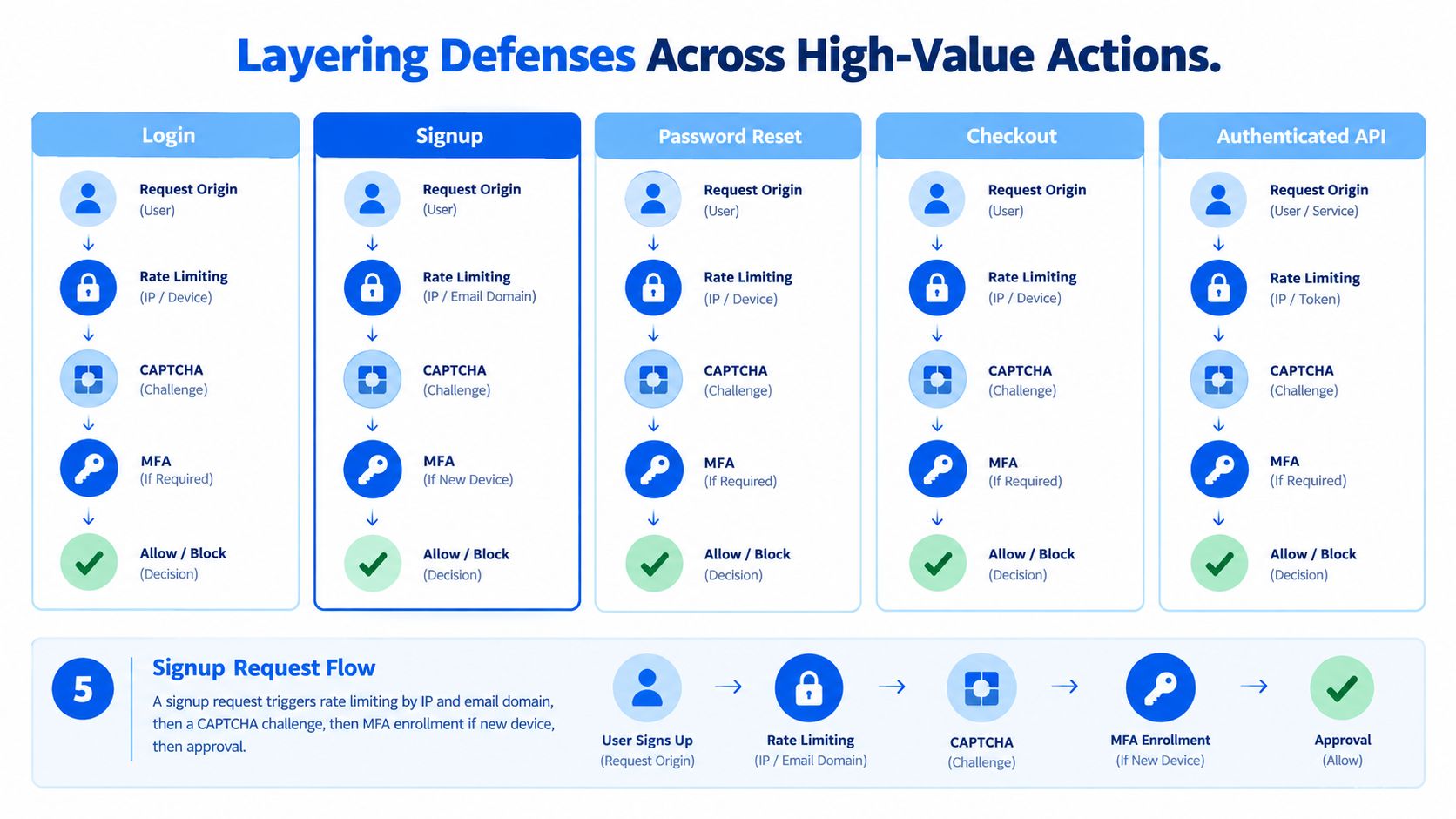
- Layering Defenses Across High-Value Actions
- Common Questions From Engineering Teams
- How aggressive should rate limiting be?
- Do account lockouts still help?
- Where does MFA create too much friction?
- How do we test coverage safely?
- What should we instrument if an API key or token leaks?
- How do we compare invisible browser verification with CAPTCHA?
- What tells us the layered defense is working?
What a Brute Force Attack Really Is
At 2:00 a.m., the login error rate starts climbing, but the traffic does not look like the old movie version of brute force. Requests are spread across IPs, user agents, accounts, and entry points. A few hit login. Others probe password reset, signup, token exchange, and recovery flows. The attacker is not trying to "guess a password" in isolation. They are testing a request pipeline until one path returns a usable identity artifact.
MITRE defines brute force as repeated attempts to guess passwords or obtain credentials, either online against a live service or offline against stolen password hashes in MITRE ATT&CK technique T1110. That distinction matters in production. Online attacks are constrained by latency, retries, and enforcement rules. Offline attacks are constrained by hash cost and available compute.
The old definition is still true, but incomplete
The classic version still exists. The Canadian government definition cited in an early academic overview describes brute force as trying all possible combinations until a match is found, while separating it from credential stuffing.
The same paper notes that the SANS Institute's 2007 Top-20 report described brute-force password guessing as “the most common form of attack to compromise servers facing the Internet.” It also cites a honeypot study that recorded nearly 300 brute-force incidents over about 11 weeks, generating 103,831 login attempts from 279 source IP addresses, with the largest single session reaching 9,311 attempts in the Clarkson University paper.
That history still matters. What changed is scale, distribution, and target selection.
In current systems, brute force is better treated as automated request abuse aimed at getting any artifact that advances the session. Sometimes that artifact is a password match. Sometimes it is a reset token, a verified signup, a remembered device, or an API token minted after a partially successful auth step.
Request abuse is the operative model
This framing changes where defenders look first.
- Login endpoints are one surface, not the whole problem.
- Signup flows get tested for enumeration, promo abuse, and account seeding.
- Reset and recovery routes can be easier to automate than primary login.
- Checkout and payment actions attract the same operators once they have account access or want to test stolen cards behind normal-looking sessions.
- Authenticated APIs often become the preferred path after initial access because they expose high-value actions with less user-facing friction.
I have seen teams ship solid password policy and still lose the control plane because retries were cheap somewhere else. Attackers follow the cheapest successful request, not the most obvious one.
Why this definition matters to engineering leaders
If a team defines brute force too narrowly, it usually rate-limits by IP on the login page and calls the job done. That helps against unsophisticated traffic. It does not hold up well against distributed automation, account rotation, residential proxies, or flows that sit adjacent to login.
Password quality still affects attacker cost. Analysts at Kaspersky found that many tested passwords fell quickly under efficient cracking methods, while a smaller share resisted much longer in Kaspersky's password brute-force time research. The operational lesson is straightforward. Credential strength matters, but production outcomes are shaped just as much by how many attempts a system permits per account, how it verifies suspicious browsers, and whether high-value actions require a stronger proof of identity than a single successful password submission.
How an Attack Actually Unfolds
A production attack rarely begins with thousands of bad passwords hitting /login. It starts with a small set of low-cost requests spread across identity surfaces, then grows once the operator learns which requests are cheap, which responses leak state, and which controls only work at the IP level.
Step one: gather usable inputs
Operators usually begin with inputs they can turn into requests quickly:
- Leaked credential pairs from past breaches or stealer logs.
- Known usernames or emails collected from public pages, signup flows, support interactions, or earlier compromises.
- Synthetic account lists created to probe signup, reset, promo, or referral flows.
The useful distinction at this stage is operational, not academic. Credential stuffing uses real username and password pairs from another service. Brute force and spraying generate guesses against accounts the attacker wants to test. In production, the same campaign often mixes all three because the goal is not to prove a technique. The goal is to find the cheapest request path that produces a valid session.
Step two: probe the request pipeline
Before volume shows up, attackers map how the application handles retries and state.
They test whether limits are keyed to IP, account, device, session, or some combination. They check whether signup, password reset, and checkout are less protected than login. They compare response timing, status codes, redirects, and body text to see what reveals account existence, password policy, lockout behavior, or MFA enrollment.
A mature operator also checks where your controls do not follow the account. If login slows down after five failures but password reset and token verification stay cheap, the attack shifts there. If browser checks appear only on the web flow, the API becomes the cleaner route.
Step three: rotate attack patterns until one stays cheap
Once the operator understands the defenses, the pattern changes.
- Credential stuffing tests exposed pairs and depends on password reuse.
- Password spraying tries a few common passwords across many accounts to stay under per-account thresholds.
- Reverse brute force holds one password constant and rotates usernames.
- Traditional guessing focuses on one account or a narrow account set with many password attempts.
The same ATT&CK classification noted earlier splits T1110 into sub-techniques for a reason. Each pattern creates different telemetry, burns through defenses at a different rate, and benefits from different infrastructure. Teams that treat all failed logins as one bucket usually miss that shift.
Step four: distribute execution
Scale comes from infrastructure more than from password dictionaries. Attackers spread requests across proxies, residential networks, cloud hosts, and instrumented browsers so each source looks ordinary enough to survive basic filtering.
Researchers studying SSH brute-force activity documented how large these campaigns can get in the NDSS 2020 poster paper. Web attacks follow the same economic model. Keep each source low and inexpensive. Rotate before a control adapts. Continue only on paths that still return useful signal.
That is why IP-only rate limiting underperforms in real systems.
Step five: spend the win immediately
The first successful authentication is usually the midpoint, not the finish.
After one account lands, the operator moves to actions that increase control or monetize access fast. Common next steps include changing recovery settings, registering a device, pulling profile or loyalty data, testing saved payment methods, redeeming credits, or calling authenticated APIs before the user notices. If the account already has a trusted session, the password-guessing phase may disappear from your visible telemetry and the abuse shows up later as account change requests or unusual transaction patterns.
For defenders, the lesson is straightforward. Brute force is a request-abuse pipeline. Password guesses are only one stage. The attacker keeps moving until account-aware limits, stronger identity checks, and browser verification raise the cost across every nearby action.
Where Attackers Hit You First
The login page gets the attention, but adjacent routes often carry more business risk because teams protect them less aggressively. Attackers know that.
The common surfaces
Here is where automation usually shows up first, and what it looks like in request logs.
| Surface | Abuse Pattern | Symptom |
|---|---|---|
| Login | Password guessing, credential stuffing, password spraying | Repeated failed auth attempts across many accounts or many passwords against one account |
| Signup | User enumeration, synthetic account creation, seeded fraud accounts | Repeated registration attempts with patterned emails, disposable domains, or abnormal retry behavior |
| Password reset | Reset abuse, token hunting, recovery flow probing | Bursts of reset requests, repeated submissions for the same account, mismatched device behavior |
| Checkout | Card testing, promotion abuse, coupon enumeration | High retry rates on payment or discount steps with low conversion quality |
| Authenticated API | Token replay, session misuse, machine-driven account actions | Valid auth artifacts paired with unusual client behavior or request cadence |
For teams protecting customer accounts, account access protection patterns are usually more useful than narrow "login only" playbooks because abuse spills between these surfaces.
Login isn't the only identity surface
Login endpoints are still prime targets, especially where retries are cheap. NIST SP 800-63B requires verifiers to limit online guessing and, in the default case, disable the authenticator after no more than 100 consecutive failed attempts on a single subscriber account in NIST SP 800-63B's verifier rate-limiting requirements. The key lesson isn't just the number. It's that limits must be account-aware.
Signup gets less attention, but it can leak account validity through inconsistent responses or timing. A signup form that says "email already in use" helps attackers refine target lists. A checkout form that allows cheap retries can become a validation endpoint for stolen cards or promo abuse. A reset route can become an account enumeration oracle.
APIs and recovery flows are where mature attackers look
Some of the most useful surfaces accept machine traffic by design. OAuth token endpoints, refresh endpoints, device registration flows, and webhook-adjacent validation routes often don't look suspicious at first glance because automation is expected there.
Sophos's 2026 Active Adversary Report says 67.32% of root causes in 2025 were related to compromised identity, explicitly including brute-force attacks, credential phishing, auth-token theft, trusted relationships, and compromised credentials. The same source also references Verizon-linked analysis saying credential abuse was the leading initial access vector for the second consecutive year and accounted for 22% of breaches, while brute force against web applications nearly tripled year over year. Sophos also cites Dashlane incident coverage where attackers targeted device-registration APIs and generated valid tokens for fewer than 20 customers, as described in the Sophos 2026 Active Adversary Report.
That should change how teams prioritize controls. If you only harden the login form, attackers will spend their time on the routes that still produce valid identity artifacts with less resistance.
Signals That Reveal Automated Abuse
The first mistake teams make is overfitting detection to source IPs. IP telemetry is useful, but it's weak on its own against distributed bots, mobile proxies, and low-and-slow campaigns.
Start with IP signals, but don't stop there
These are still worth collecting:
- Request concentration by source for sudden bursts or odd hour spikes.
- Distinct accounts per source to spot spraying and enumeration.
- Geographic inconsistency when traffic patterns don't match the customer base.
- Network reputation and ASN context to separate obvious commodity infrastructure from harder cases.
The problem is durability. Rotating proxies and botnets can keep each source just quiet enough to avoid simplistic thresholds.
Recent telemetry supports that concern. Barracuda reported that brute-force attacks against network devices rose sharply in early 2026, with about 88% of traffic traced to the Middle East and 56% of all confirmed incidents handled by Barracuda Managed XDR occurring between February and March. The same summary cites honeypot analysis recording over 20 million SSH brute-force attempts in about 100 days and Fortinet reporting roughly 67.65 billion brute-force events globally in 2025, or about 185 million attempts per day, in this Barracuda and industry reporting summary.
Account-aware signals hold up better
What survives IP churn is correlation around the account, session, and client pattern.
| Signal | What it measures | Strength against distributed bots |
|---|---|---|
| Failed attempts per account | Repeated abuse focused on one identity | High |
| Distinct accounts per client pattern | Spraying and enumeration across rotating sources | High |
| Time to first failure after registration | Abuse against newly created accounts | Medium to high |
| Reused password candidate across many accounts | Password spraying behavior | High |
| Header ordering and request shape consistency | Automation frameworks reusing templates | Medium |
| TLS fingerprint clustering | Shared client implementations behind many IPs | Medium to high |
| Form interaction timing | Human versus scripted submission behavior | Medium |
Teams that want to tie retries and replay behavior back to business impact should look at research on retries, replay, and business outcomes, especially when checkout and account flows are both in play.
Watch for the pattern that persists when the attacker changes IPs, not the indicator that disappears first.
Instrumentation that avoids alert fatigue
A practical detection stack usually combines application logs, auth service metrics, edge telemetry, and a SIEM rule set that groups events by account and client characteristics, not just by source address.
Useful examples include:
- Correlate by account identifier even when the source rotates.
- Track success after repeated failure because that often marks the account that needs immediate review.
- Compare browser and transport fingerprints across many accounts to spot the same automation framework.
- Store decision outcomes so analysts can review what enforcement blocked versus what merely looked strange.
The goal isn't infinite visibility. It's enough context to distinguish bad passwords from coordinated abuse.
Controls That Actually Slow Attackers Down
Teams usually start with the same four controls because those are the ones that fit neatly into a login backlog. In production, brute force defense works better when you treat it as request abuse across several surfaces, not as a password problem isolated to one endpoint. The controls below slow attackers for different reasons, and each one fails in predictable ways if it stands alone.
Control trade-offs at a glance
| Control | Primary defense | Known bypass technique |
|---|---|---|
| IP and account rate limiting | Slows repeated online guessing and credential reuse | Distributed proxy rotation, low-and-slow pacing, batching attempts across identities |
| MFA | Reduces value of stolen or guessed passwords | MFA fatigue, session theft, token theft, targeting non-MFA-protected flows |
| Account lockouts and progressive delays | Raises cost of repeated failures on a target account | Username-based denial of service, account enumeration, spraying across many accounts |
| Browser verification | Filters automated request execution before or around sensitive actions | Advanced browser automation, stolen session artifacts, mixing human-operated abuse with scripted traffic |
Rate limiting works when it follows the account, not just the IP
IP-only throttles help with noisy floods. Coordinated login abuse usually spreads across many addresses, so the control that matters most is the one tied to the identity being targeted.
A better pattern uses several counters at once:
- Per-account limits for repeated failures on one identity
- Per-source ceilings for obvious flood behavior from an IP, subnet, or ASN
- Endpoint budgets for unauthenticated routes such as login, reset, signup, and token issuance
- Action-aware counting that measures credentials attempted or accounts targeted, not just raw HTTP requests
That last point matters. Attackers optimize around whatever you count. If a GraphQL login mutation can batch many credential attempts into one request, a request-based limiter gives away free tries. OWASP calls out broken authentication patterns like this in its API Security guidance.
Implementation details decide whether a limiter holds up under pressure. Return 429 with a Retry-After header. Keep counters close to the auth decision so retries do not race each other. If you need a reference for applying scoped throttles on high-value actions, rate-limit controls for high-value requests are a useful example.
MFA has the highest impact, but not infinite coverage
MFA still changes the economics in your favor. A guessed password is less useful when the attacker also needs the second factor.
Coverage is the hard part. Login may require MFA while recovery, device registration, token refresh, API token creation, or step-up flows do not. Attackers find the cheaper path. Security teams should assume brute force pressure will move toward whichever request path grants a session with the least friction.
That is why MFA works best as part of a request-abuse design. Apply it where account takeover becomes valuable, and make sure adjacent flows cannot bypass the check.
Lockouts and browser verification need careful tuning
Hard lockouts can stop repeated guessing against one account, but they can also create support volume and easy denial of service against public usernames. Consumer systems often do better with progressive delay, temporary challenges, and account-aware monitoring than with a long fixed lock.
Browser verification solves a different problem. It evaluates whether the request came from a credible browser environment before you spend trust on the action. That helps on login, but it also matters on signup, checkout, password reset completion, and authenticated APIs where automated traffic can monetize abuse without ever tripping a password guess threshold.
I have seen this combination work best: account-scoped throttles to cap repeated attempts, MFA to cut the value of a successful guess, and browser checks to keep cheap automation away from sensitive paths in the first place. None of those controls is perfect. Together they force attackers to spend more infrastructure, slow their testing loop, and move onto surfaces where detection is easier.
Layering Defenses Across High-Value Actions
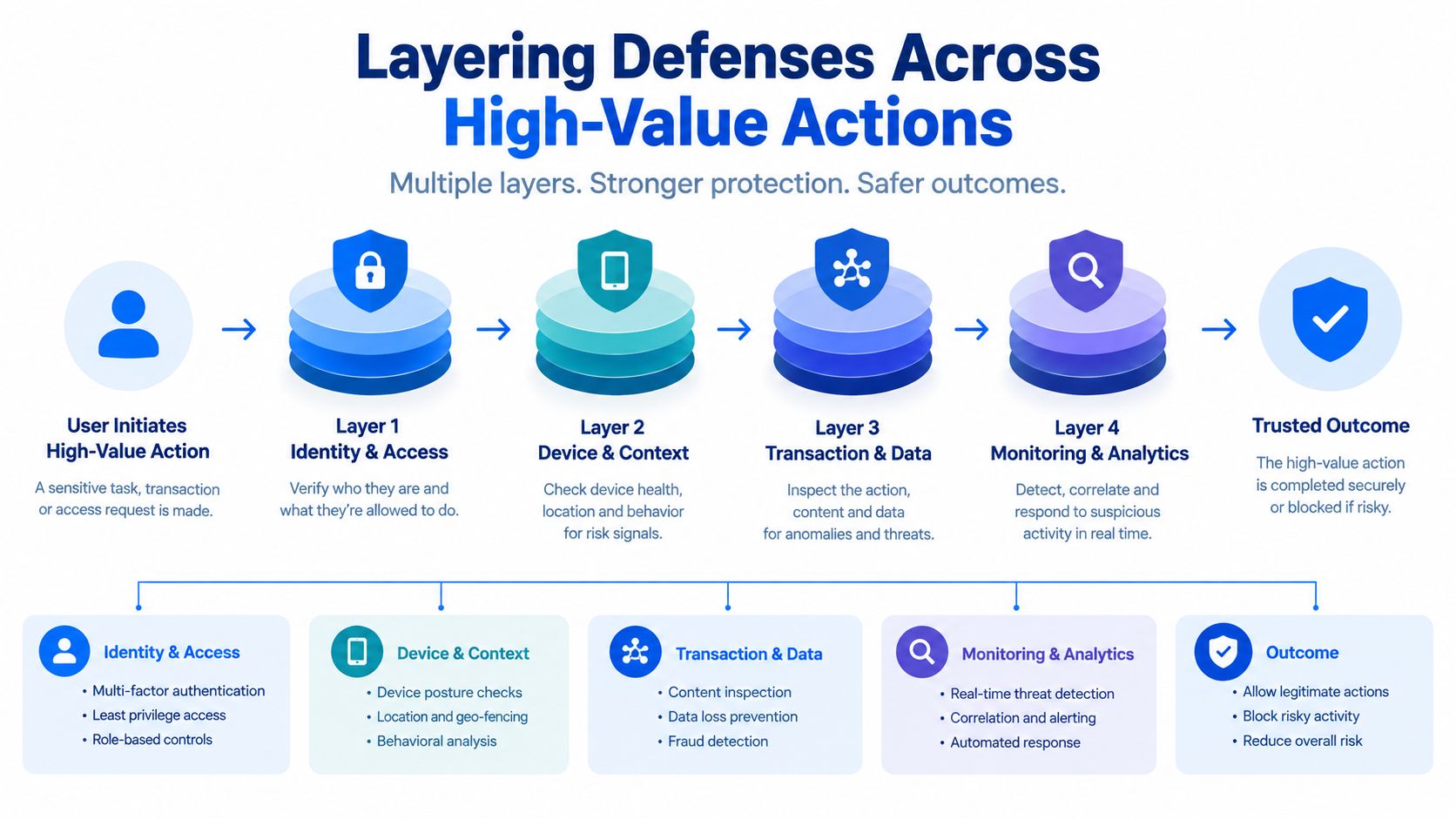
The strongest production setups don't depend on one gate. They stack checks so the attacker has to beat several different systems with different assumptions.
What the layered path looks like
A solid request path usually does four things in sequence:
- Evaluate the client early. Check browser and transport characteristics before expensive app logic runs.
- Apply scoped throttles. Limit by account, identity artifact, and source context.
- Require stronger auth when risk rises. Unfamiliar devices and sensitive changes shouldn't look like ordinary logins.
- Validate the action itself. Checkout, reset completion, device registration, and authenticated API calls need their own controls.
Different surfaces carry different abuse economics. Signup creates new attack surface. Reset flows can short-circuit the password. Checkout can monetize abuse without a lasting session. APIs can turn one compromised identity into a large volume of machine activity.
Surface-specific weighting beats one global policy
A uniform rule set is easier to deploy and easier for attackers to map.
A better approach is selective friction:
- Signup should validate that the request environment looks legitimate before account creation succeeds.
- Login should use account-aware throttling and adaptive step-up authentication for risky cases.
- Password reset should get stricter retry control and careful anti-enumeration responses.
- Checkout should focus on replay resistance, request integrity, and abusive retry detection.
- Authenticated APIs should rate limit by client identity, token context, and action type, not just by source IP.
The right model is not "protect login." It's "protect every action that can create, recover, spend, or extend identity."
Minimum viable layering for a small team
A small engineering team doesn't need a giant fraud platform to improve quickly. It needs disciplined coverage on the highest-value actions.
Start with this baseline:
- Protect unauthenticated endpoints first. Public guidance recommends rate limits not only for login but also for register, forgot-password, reset-password, and MFA verification flows. One cited implementation target is no more than 10 requests per minute per IP on login and no more than 5 requests per minute on password reset, with 429 responses after repeated failures, in this authentication endpoint rate-limiting pattern.
- Make responses uniform. Don't reveal whether an account exists through wording or timing.
- Step up for unfamiliar context. New device, unusual location, or suspicious request patterns should trigger stronger verification.
- Review in observe mode before hard blocking. New controls should be tuned against real traffic to avoid breaking legitimate users.
That last point matters more than many teams admit. Good defenses fail when they're deployed too aggressively, too early, without enough decision review.
Common Questions From Engineering Teams
How aggressive should rate limiting be?
Start tighter on the routes that attackers can hit cheaply, then loosen based on observed user behavior. Consumer apps usually need more tolerance for mistyped passwords than admin portals, but both need per-account limits.
If you're only limiting by source IP, you're probably solving the easiest version of the problem. Distributed residential traffic will route around that.
Do account lockouts still help?
They help against concentrated guessing on a single account. They help less against credential stuffing and spraying, where the attacker spreads attempts across many identities.
Use them carefully when usernames are public or easy to guess. Otherwise, attackers can turn your lockout policy into a denial-of-service tool against real users.
Where does MFA create too much friction?
MFA creates the most value when tied to risk and sensitive actions, not when sprayed across every path with the same policy. High-friction MFA on ordinary low-risk logins can hurt conversion and support load. Weak recovery flows can erase the security benefit anyway.
A better question is whether the important action is gated. Password change, device registration, token refresh, payout changes, and checkout approval often matter more than the first login screen.
How do we test coverage safely?
Use staging where possible, but don't rely on it alone. Production traffic has edge cases that test environments don't.
A practical approach is to deploy new detection in observe mode first, review decision quality, then enable enforcement on the highest-confidence patterns. That reduces the risk of blocking legitimate customers while still surfacing the attack paths.
What should we instrument if an API key or token leaks?
Track usage by action, client behavior, and request shape. A valid token from the wrong environment often shows up as a behavioral mismatch before it shows up as a cryptographic one.
Look for:
- Unexpected action mix from a token that used to access only a narrow feature set.
- Client consistency changes such as different request structure or fingerprint clusters.
- Replay patterns where requests look mechanically duplicated rather than user-driven.
How do we compare invisible browser verification with CAPTCHA?
They solve different problems. CAPTCHA asks the user to prove they're human through an interactive challenge. Invisible browser verification tries to evaluate the legitimacy of the browser environment without stopping the user.
For teams protecting signups, logins, checkout, and API-adjacent web actions, invisible verification is often the better first control because it doesn't spend user patience on every suspicious moment. It also fits the broader mandate many teams now have, which is protecting important website actions from automated abuse without CAPTCHAs.
What tells us the layered defense is working?
Don't look only at blocked request counts. That can reward noisy controls.
Better signals include lower successful takeover volume, fewer suspicious retries reaching expensive endpoints, fewer abuse-driven support cases, and cleaner separation between legitimate user flows and automated traffic. In an incident, the first 24 hours matter most. Reset exposed credentials, invalidate active sessions or tokens where appropriate, raise authentication requirements on affected accounts, and increase monitoring on recovery and API paths before attackers pivot.
MANDATE gives teams a way to add invisible browser verification to high-value web actions so they can distinguish legitimate users from automated abuse without CAPTCHAs. It collects browser proof, validates it on the server, supports staged rollout through Observe mode, and can be integrated at the edge, in cloud environments, or in application middleware. If you're tightening defenses around login, signup, checkout, or sensitive API flows, visit MANDATE.