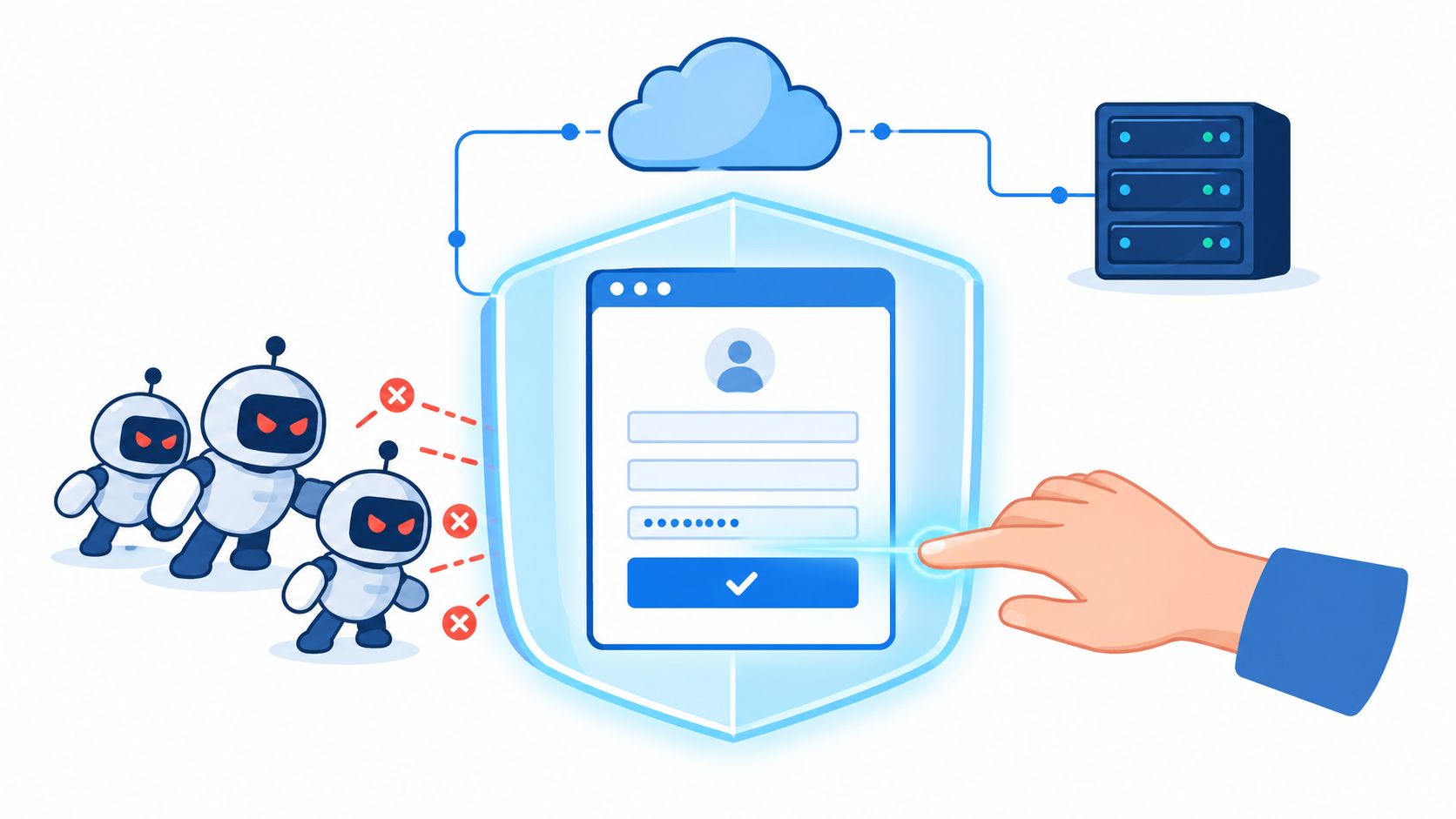
A signup form can look healthy in your analytics while automated scripts create accounts faster than your team can investigate them. The same problem appears at checkout, login, ticket reservation, and password recovery. Your immediate choice often seems binary: put every visitor behind a CAPTCHA wall, or accept requests and absorb the abuse.
Bot detection software gives you a third option. It collects evidence about a request, evaluates that evidence against technical and behavioral signals, and returns a decision your application can use. Detection answers whether activity appears automated. Mitigation decides what to do next, such as allow, flag, rate-limit, challenge, or block.
The need is no longer marginal. The 2025 Bad Bot Report found that automated systems generated 51% of global web traffic in 2024, while malicious bots generated 37%. Effective defenses therefore need to distinguish useful automation, such as search crawlers and authorized workflows, from abuse without treating every automated request as hostile.
Table of Contents
- What Bot Detection Software Actually Does
- The Main Detection Approaches Explained
- Where Bot Detection Runs in Your Stack
- How to Choose a Bot Detection Approach
- Implementing Detection Without Breaking Users
- How Server-Verified Browser Proof Fits In
- Common Misconceptions That Lead to Weak Defenses
- Choosing and Tuning Your Bot Defenses
What Bot Detection Software Actually Does
Consider a retail signup endpoint during a promotion. Real customers arrive from ordinary browsers, but scripted clients submit account forms repeatedly, rotate network addresses, and reuse the same automation patterns. A visible CAPTCHA on every request may slow the scripts, but it also makes legitimate registration harder. A silent decision can inspect the request first and escalate only when the evidence warrants it.
That is the core job of bot detection software. It gathers signals from the browser, network, protocol, session, and request sequence, then produces evidence that another system can interpret. The software itself doesn't necessarily decide the business outcome. Your application still needs a policy for what happens when confidence is high, low, or uncertain.
Detection and mitigation are different jobs
Detection might identify a missing browser capability, an unusual TLS fingerprint, a datacenter network, or a request sequence that doesn't resemble normal customer activity. Mitigation turns that finding into an action:
- Allow: Continue the request with no visible interruption.
- Flag: Store the event for review or downstream risk analysis.
- Rate-limit: Reduce request volume without denying the user permanently.
- Challenge: Ask for additional proof only when risk justifies friction.
- Block: Reject the request when multiple signals indicate clear abuse.
This separation matters because a detector can be accurate while a policy is harmful. Blocking every unfamiliar browser may stop some scripts, but it can also reject privacy-focused users, enterprise proxies, mobile browsers, and people using assistive technology.
CAPTCHAs also show why a detection method can't be judged only by whether attackers eventually fail. CAPTCHA technology began in 1997, and a survey of 77 CAPTCHA schemes documented how many were later weakened or defeated as automated recognition improved. Research cited in the history and usability analysis of CAPTCHA systems reported that distorted-text challenges historically took an average of 9.8 seconds to solve and that approximately 100 million reCAPTCHAs appeared daily. The resulting burden was substantial even before attackers began outsourcing or automating challenge solving.
The practical design is to keep evidence collection separate from server-side state. A browser can collect runtime evidence, but the server should decide whether that evidence is fresh, connected to the current session, and valid for the specific action. Teams evaluating retail abuse can also learn from how Securify stops store bots, particularly the distinction between broad traffic filtering and controls aimed at valuable store actions.
For a concise treatment of attack patterns and defensive responses, see MANDATE's guide to bot attacks. The important question isn't “Can this request complete a puzzle?” It is “Do we have enough trustworthy, current evidence to allow this action without imposing unnecessary friction?”
The Main Detection Approaches Explained
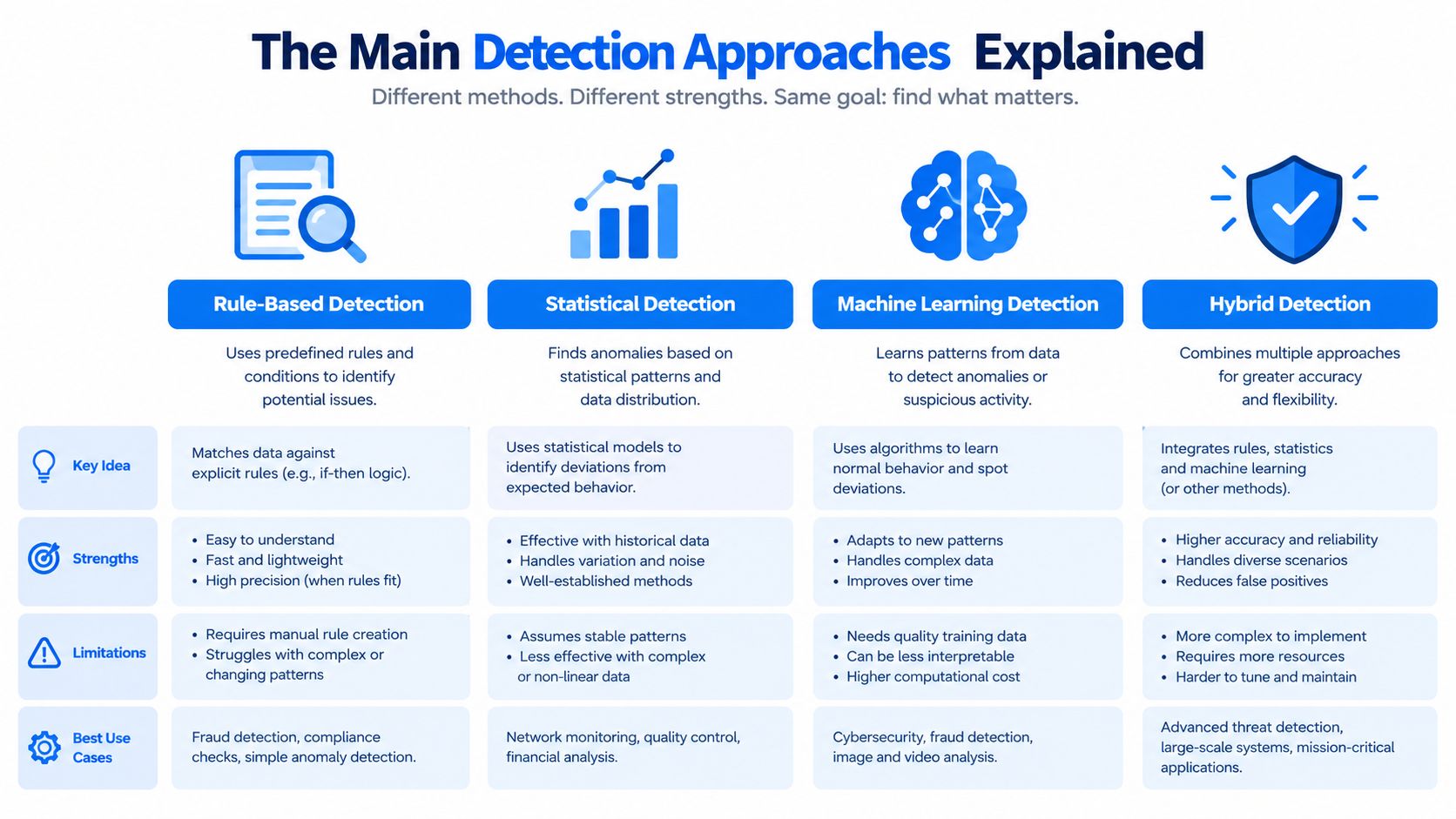
No single signal reliably identifies every automated client. A practical system combines several approaches, gives each signal an appropriate weight, and keeps the final decision on infrastructure the requester can't alter.
Start with client and browser verification
A browser-side script can observe runtime properties while a page loads and during interaction. It may identify inconsistencies in JavaScript execution, rendering behavior, installed capabilities, or automation artifacts, then produce a proof token for server validation. A missing WebGL capability isn't automatically malicious, but it becomes useful when combined with other evidence and an action such as rapid account creation.
Client evidence is valuable because the browser exposes characteristics that a raw HTTP request doesn't. It is also fragile when the browser is modified, privacy settings change, or an attacker emulates a complete browser. Treat the result as evidence, not as a permanent identity.
Add server-side network and protocol signals
The server can inspect IP reputation, autonomous system information, request rates, TLS fingerprints, header consistency, and protocol behavior. A datacenter ASN may increase risk for a consumer signup, while a familiar corporate network might be normal for an internal application. Neither signal should determine the result alone.
OWASP's bot management guidance identifies JA3 and JA4 TLS ClientHello fingerprints, HTTP/2 settings and frame ordering, and Client Hints as useful signals. These indicators can remain available even when an attacker rotates IP addresses, but legitimate browsers also vary across operating systems, versions, privacy settings, and enterprise proxies.
Analyze behavior across the session
Behavioral analysis looks at sequences rather than one request. Mouse paths, keystroke cadence, scrolling, navigation timing, and form completion can reveal automation that imitates a normal browser but moves through a workflow with unusual consistency. A form filled in less than 50 milliseconds might deserve scrutiny, but speed alone isn't proof of abuse because autofill, password managers, and accessibility tools can produce fast interactions.
Session-level context is stronger. Repeated navigation through the same routes, identical field sequences, or a group of accounts sharing the same browser characteristics gives the detector more to evaluate than a single click.
Escalate with challenges only when justified
Challenges include invisible checks, proof-of-work, and interactive puzzles. They can be useful when passive evidence is ambiguous, but they impose cost on legitimate users and give attackers a target to study. A failed challenge is a meaningful signal, not a universal reason to block the user permanently.
Fingerprinting cuts across all four approaches. It can connect browser, device, network, and behavioral observations, but it should remain probabilistic. Teams protecting direct-to-consumer businesses can also review guidance on protecting DTC brands from fraud for a broader view of how bot activity intersects with account and transaction abuse. MANDATE's anti-bot verification overview offers another example of an invisible, proof-oriented model.
Where Bot Detection Runs in Your Stack
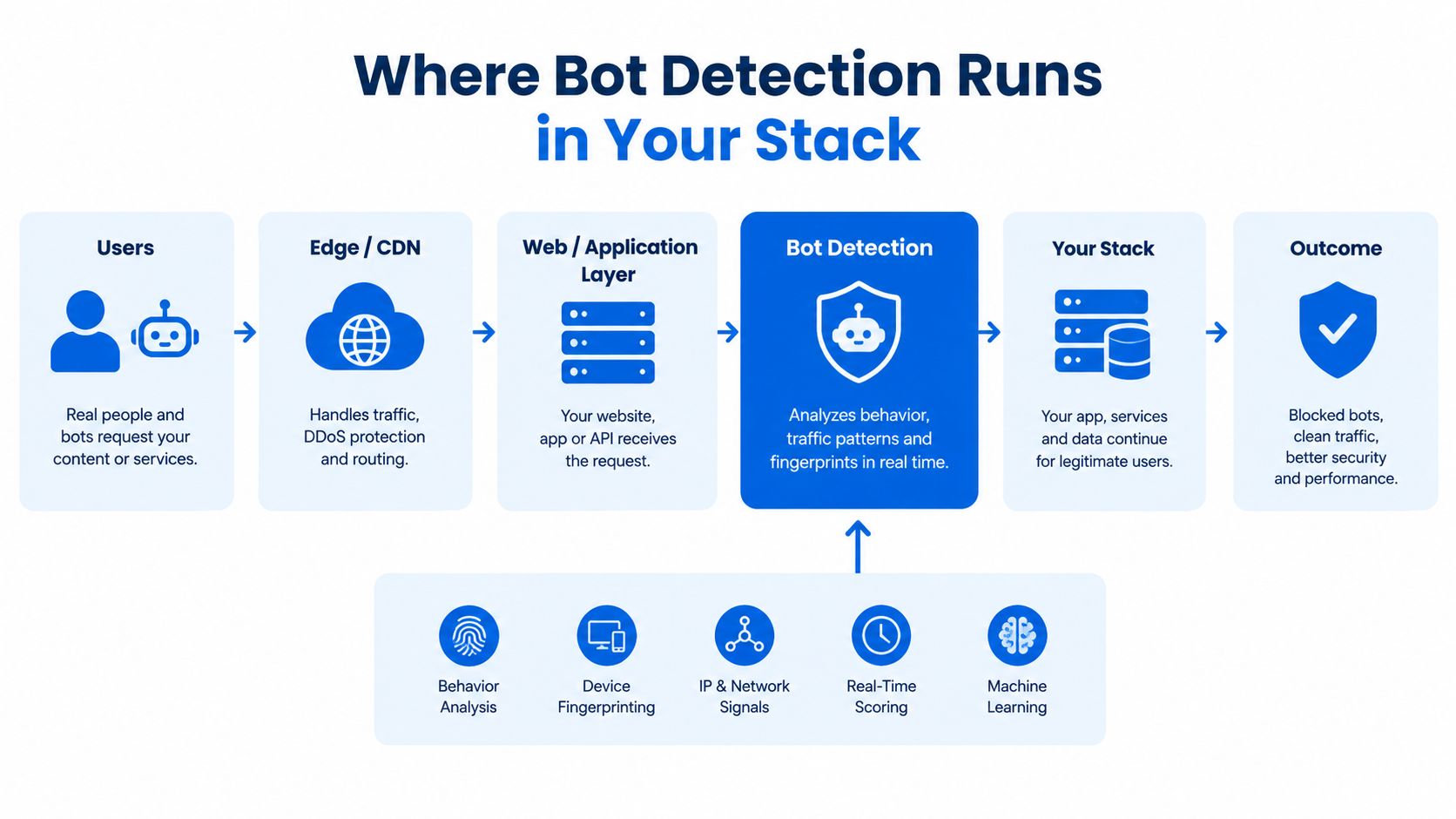
The deployment layer changes what the detector can see, how quickly it can respond, and how closely it can connect a decision to business context. Most production systems use more than one layer.
Edge checks remove obvious abuse early
An edge component sits in front of the origin and often in front of application infrastructure. It can terminate TLS, apply rate limits, inspect basic headers, and reject requests that clearly violate a policy. This layer is fast and economical for volume control, but it usually lacks account state, cart value, authentication history, and the business meaning of the requested action.
Edge filtering works well for a request that is plainly malformed or arriving at an abusive rate. It works less well when a legitimate user shares a network with suspicious traffic or when an attacker uses a normal browser.
Cloud detection adds heavier analysis
A cloud service can receive telemetry from the edge or a browser SDK, correlate signals, and return a verdict through an API. This supports richer models and centralized visibility, but it introduces a dependency, network latency, and a data-handling decision. Your team needs clear timeout behavior and a plan for what happens if the service is unavailable.
Don't make the browser responsible for trusting its own verdict. A script can collect evidence, but the server or verification service must validate the proof, check its freshness, and associate it with the correct request.
The application owns the final business decision
In-app checks sit closest to the action being protected. The application knows whether a request creates an account, changes a payout destination, places an expensive order, or merely loads a public page. It can combine the detector's result with session continuity, account age, transaction context, and user permissions.
A signup request might follow this path:
- The edge pre-filters: It applies basic rate and protocol rules.
- The browser collects evidence: A client integration gathers runtime signals during page load.
- The verification service checks proof: It validates the submitted evidence and returns a verdict with reason codes.
- The application decides: The signup endpoint allows, flags, rate-limits, or challenges that specific request.
Server-verified browser proof is the important boundary. IP rotation changes network identity, but it doesn't necessarily change the browser's protocol and execution characteristics. At the same time, browser evidence isn't trusted merely because it came from JavaScript. The server anchors the decision to state it controls.
How to Choose a Bot Detection Approach
Buyers often compare products by counting features. That approach hides the trade-offs that matter in production. Score each option against the workflow you need to protect, then weight the criteria according to the cost of a false positive and the cost of missed abuse.
| Criterion | Why It Matters | Scoring Question | Common Failure |
|---|---|---|---|
| Accuracy | A detector must separate ordinary users from automated abuse without treating unusual users as attackers. | Can the team measure precision and recall for signup, login, checkout, and other named actions? | A high headline block rate hides legitimate users who were denied. |
| Latency | Inline checks sit on a critical request path. Slow verification can damage completion even when the verdict is correct. | Does the integration fit the endpoint's latency budget, including timeout behavior? | A synchronous fingerprint call becomes the slowest part of checkout. |
| Privacy | Browser collection can involve device and runtime evidence that requires governance and clear disclosure. | Can the team explain what is collected, where it is processed, and why it is needed? | Passive collection is enabled without a consent or retention plan. |
| Anti-replay | A stolen proof or previously valid payload shouldn't authorize a later transaction. | Is proof short-lived, tied to a server nonce, and checked against the current session and action? | The application accepts a client-held token as permanent proof. |
| Observability | Security teams need to tune decisions and explain them to support, compliance, and engineering. | Can analysts see reason codes, replay a decision context, and compare completion by cohort? | The dashboard reports blocks but not false positives or successful actions. |
A fintech flow may weight accuracy, anti-replay, and auditability most heavily because an incorrect decision can affect access to money. A marketplace may give more weight to behavioral and network correlation because abuse can involve many accounts and sellers. A developer tool with a public signup may prioritize privacy, integration effort, and a low-friction path for legitimate users.
For transactional workflows, use a fresh server challenge or nonce. NIST defines a replay attack as capturing access-control information and retransmitting it to gain access or produce an unauthorized effect. Its guidance on replay resistance and freshness explains why a verifier should reject old evidence that lacks the expected nonce or timing data.
Don't confuse an access token with proof that the current browser is legitimate. A token authorizes access after authentication, but possession of that token alone doesn't establish where the current request originated. Teams investigating abuse may also encounter services that rent SMS numbers, which is one reason phone verification should supplement, not replace, request and session analysis.
Implementing Detection Without Breaking Users
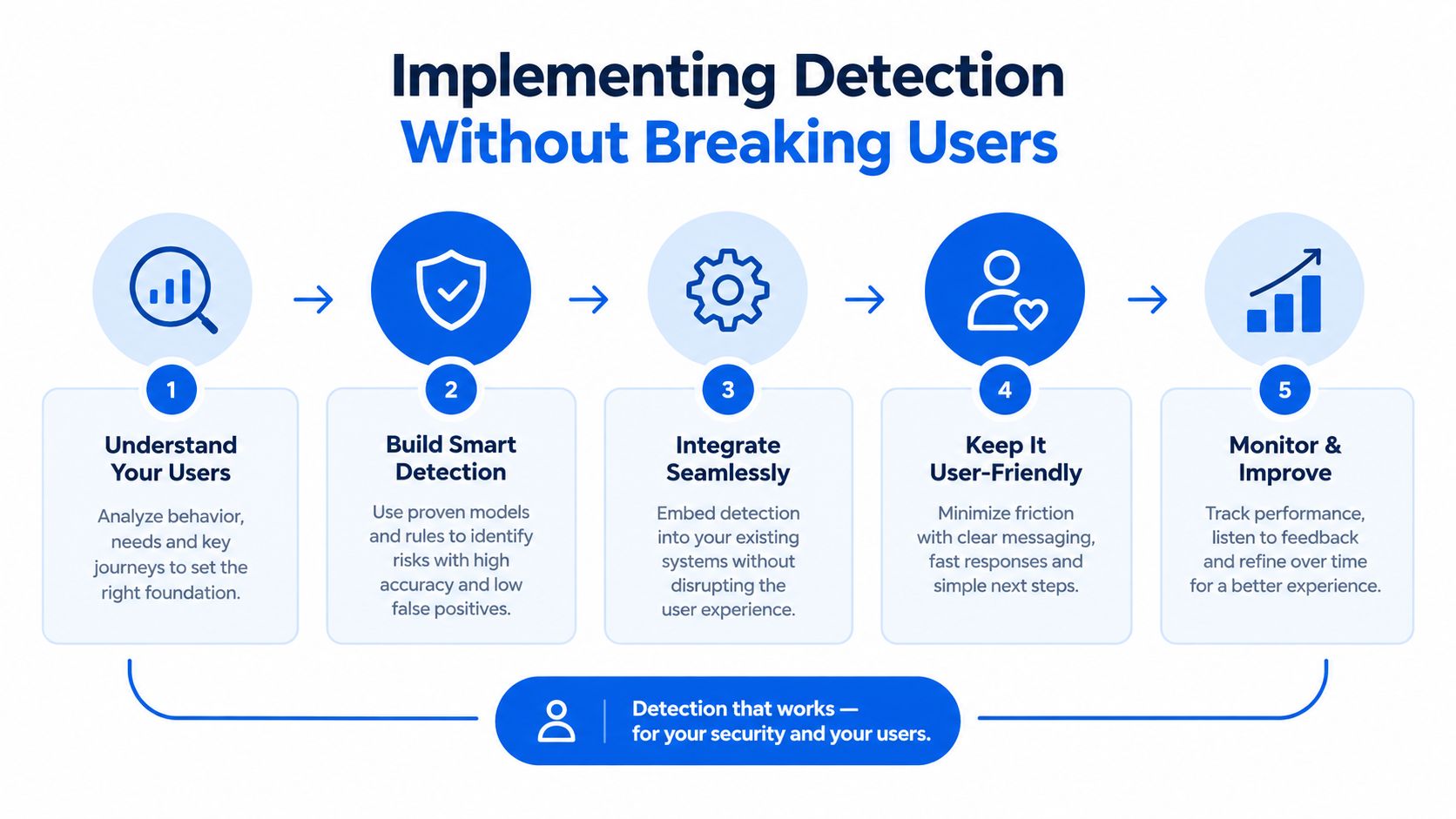
The safest rollout starts with measurement, not blocking. Put the detector in Observe mode, collect its signals and decisions, and send those events to your analytics system without changing what users can do. This gives you a baseline for human completion, suspicious cohorts, route-specific errors, and false positives.
Choose one named action first, such as create_account or place_order. Record the start, verification result, application outcome, and successful completion as separate events. A block count tells you what the detector denied. A completion count tells you whether legitimate users still reached the business outcome.
Promote decisions in stages
Use a controlled sequence rather than switching every route to enforcement:
- Observe: Log evidence, verdicts, reason codes, and completion outcomes while users experience no new friction.
- Shadow enforcement: Calculate what the policy would have done, but keep the result out of the request path.
- Targeted escalation: Apply a soft response to a narrow, high-risk cohort or action.
- Route-specific enforcement: Protect account creation, login, checkout, or ticket reservation according to separate thresholds.
- Continuous review: Compare outcomes by browser family, geography, accessibility path, and authenticated state.
Set a strict latency budget for inline checks and define timeout behavior before launch. A detector that stalls a paying customer is a production failure, even if it eventually returns a good verdict. For a low-confidence timeout, many teams choose a controlled fail-open path with rate limits and logging, while keeping stronger enforcement for high-confidence abuse.
Every decision should include an auditable reason field. “Blocked” isn't enough. Store whether the decision involved replayed evidence, an invalid proof, unusual protocol characteristics, a route-specific rate violation, or several independent signals.
Operational rule: Tune for successful completion of a named action, not for the largest possible denial count.
Include support and accessibility teams before enforcement. Screen readers, password managers, corporate proxies, privacy tools, and unusual browsers can look different from the majority population. Add allowlists only for well-understood service identities, keep them narrow, and review them because an allowlist can become an attacker's easiest route around controls.
How Server-Verified Browser Proof Fits In
The most useful architecture separates evidence collection from server-side state. The browser can gather runtime proof while the page is open, but the server records the nonce, timestamp, session association, and final decision. That split prevents a client-side “pass” value from becoming the authority.
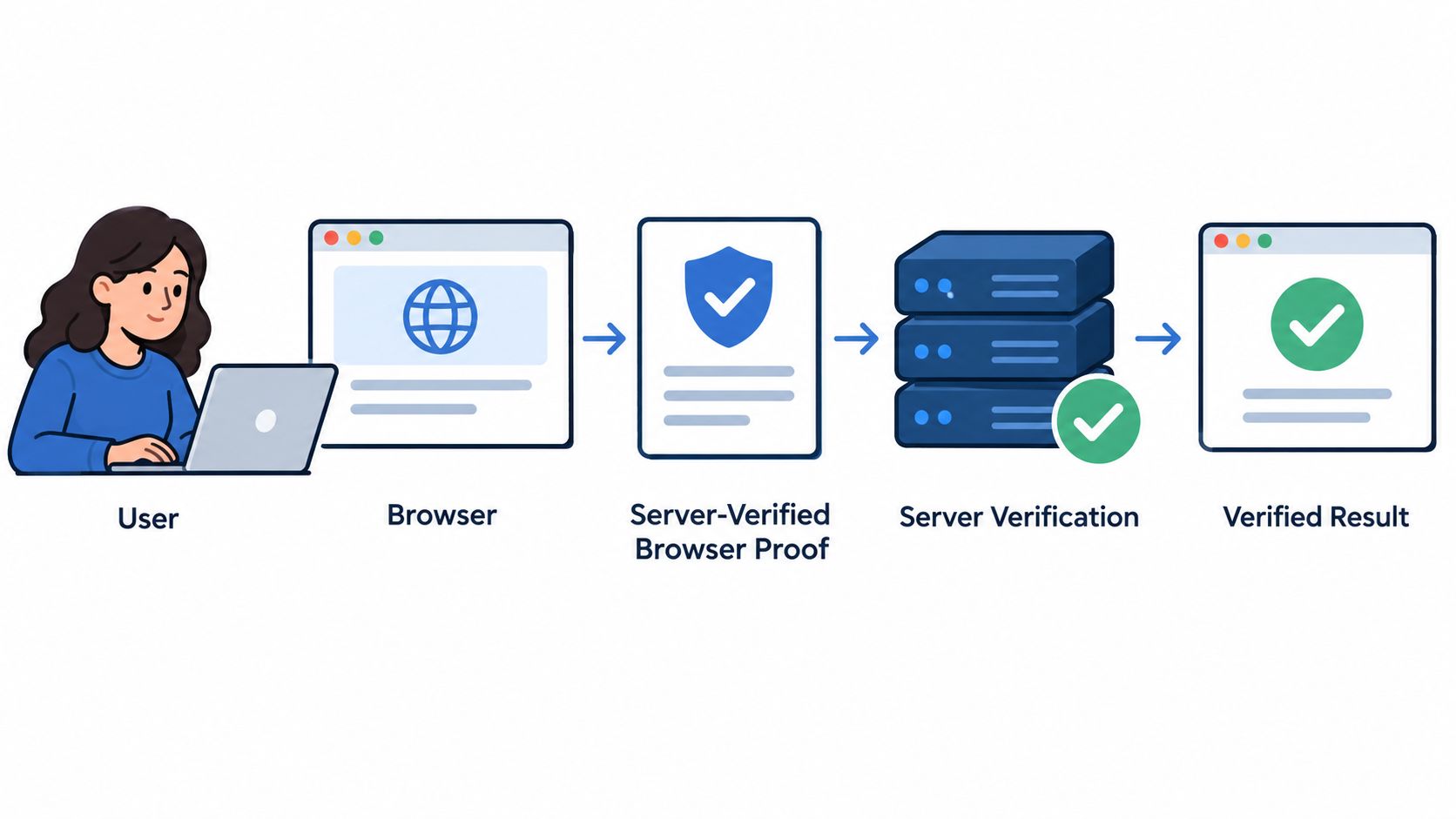
A typical signup request works like this:
- Page load: The browser integration gathers passive evidence without interrupting the user.
- Fresh proof: The server or verification service provides a short-lived challenge context.
- Form submission: The browser attaches proof to the signup request.
- Edge screening: The edge rejects obviously abusive traffic before it reaches the origin.
- Server verification: The verification layer checks the proof, nonce, timestamp, and request context.
- Application decision: The signup service allows, flags, rate-limits, or escalates the action.
This design gives each component a narrow responsibility. The edge handles volume and obvious protocol abuse. The browser contributes evidence that a plain request doesn't contain. The verification service checks cryptographic or signed proof. The application remains the source of truth for account and transaction state.
MANDATE provides invisible browser verification, browser proof collection with server-side validation, integrations at the edge, cloud, and application layers, and Observe mode for reviewing decisions before enforcement. Its documented model is aimed at protecting high-value web actions without CAPTCHAs, while keeping enforcement controls available for allow, flag, or block outcomes. The reasoning behind this architecture is described in why browser proof needs server state.
Invisible proof isn't automatically superior in every situation. It still needs privacy review, careful expiry handling, accessibility testing, and resilience against full-browser automation. Its advantage is operational: legitimate users don't have to solve a puzzle, attackers can't rely on a reusable client token, and engineers receive structured evidence for tuning.
Common Misconceptions That Lead to Weak Defenses
A high block rate doesn't prove that a bot defense works. It may show that the system is aggressive, that a network blocklist is broad, or that legitimate traffic is being denied. The useful measure is whether the control reduces abuse on a named workflow while preserving legitimate completion and keeping an explanation for each decision.
| Common Misconception | Why It Fails | Stronger Approach |
|---|---|---|
| More blocked requests means better security. | Attackers can shift routes, networks, or browser behavior, while legitimate users absorb the friction. | Track abuse prevented, legitimate completion, false positives, and decision reasons by workflow. |
| IP reputation is enough. | Attackers rotate addresses, and shared networks can contain both good and bad users. | Combine network evidence with browser proof, protocol signals, session continuity, and action context. |
| A CAPTCHA wall stops automation. | Attackers can target the challenge, use headless or full browsers, or outsource solving. | Use passive signals first and escalate only when independent evidence supports it. |
| Every bot is malicious. | Search indexing, monitoring, AI assistants, and user-authorized automation can be beneficial. | Classify automation by identity, authorization, behavior, and requested action. |
| Client-side proof is the decision. | Attackers can alter browser code, copy tokens, or replay stale artifacts. | Validate proof on the server and bind it to freshness, nonce, session, and action. |
| Accessibility is an edge case. | Interactive challenges can create barriers for screen readers and assistive technology users. | Test with accessibility teams and prefer invisible checks on the normal path. |
The threat classification problem is becoming more important because automation is not one category. The 2025 reporting cited in the Imperva analysis of AI bot traffic found that AI bots reached business-critical surfaces, including forms, login pages, and checkout flows. That doesn't make every AI-assisted request malicious. It does mean teams need policies that distinguish authorized automation from attempts to create accounts, access data, or complete transactions at scale.
Replay resistance deserves separate attention. A previously valid payload can still be dangerous if the application accepts it without checking freshness. Short-lived server state, nonce binding, and action-specific verification are more durable than assuming that a cookie or bearer token proves the current request is trustworthy.
Audit question: Could an engineer explain why this request was blocked, what evidence was present, and whether a legitimate user could appeal the decision?
Use graduated responses when evidence is ambiguous. Observe, allow, flag, rate-limit, challenge, and block are different tools. Treating them as one “bot detected” outcome makes it harder to protect users and easier to create unexplained operational failures.
Choosing and Tuning Your Bot Defenses
Start with the action, not the vendor category.
| Workflow | Practical starting point | Signals to emphasize |
|---|---|---|
| Public signup | Invisible browser and session verification with staged enforcement | Fresh proof, device consistency, form sequence, rate patterns |
| Authenticated account area | Session-aware detection with stronger checks on sensitive changes | Login continuity, replay resistance, protocol evidence, account context |
| Checkout | Low-latency verification before the final action | Freshness, browser proof, transaction context, request integrity |
| API endpoint | Server-side telemetry and identity-aware policy | Authentication, request sequence, client consistency, endpoint-specific limits |
For a public form, begin with passive evidence and Observe mode. For a checkout flow, keep the normal path fast and reserve escalation for requests with multiple independent signals. For an API, don't assume that a valid credential means the request is safe. Inspect how the client behaves over time and whether the requested operation matches its authorization.
Review thresholds after meaningful traffic changes, seasonal campaigns, new browser releases, and changes to login or checkout UX. Recheck allowlists and service identities. Compare successful completions with flagged and blocked events, and break the results down by route, browser, region, authentication state, and accessibility path.
A useful system also makes future investigation easier. Keep the evidence record separate from the enforcement decision, retain reason codes, and ensure analysts can distinguish “invalid proof” from “high-risk behavior” or “policy block.” That structure helps engineering teams tune controls without rewriting the application's business logic.
The right bot detection software won't promise complete protection. It should give your team trustworthy evidence, fresh server-side state, clear decisions, and enough control to protect important actions without turning every legitimate customer into a suspect.
If your team needs invisible browser verification for signups, logins, checkouts, or other high-value actions, MANDATE provides browser proof, server-side validation, Observe mode, and enforcement controls for staged bot defense. Visit MANDATE to review the integration options and decide where server-verified evidence fits in your stack.