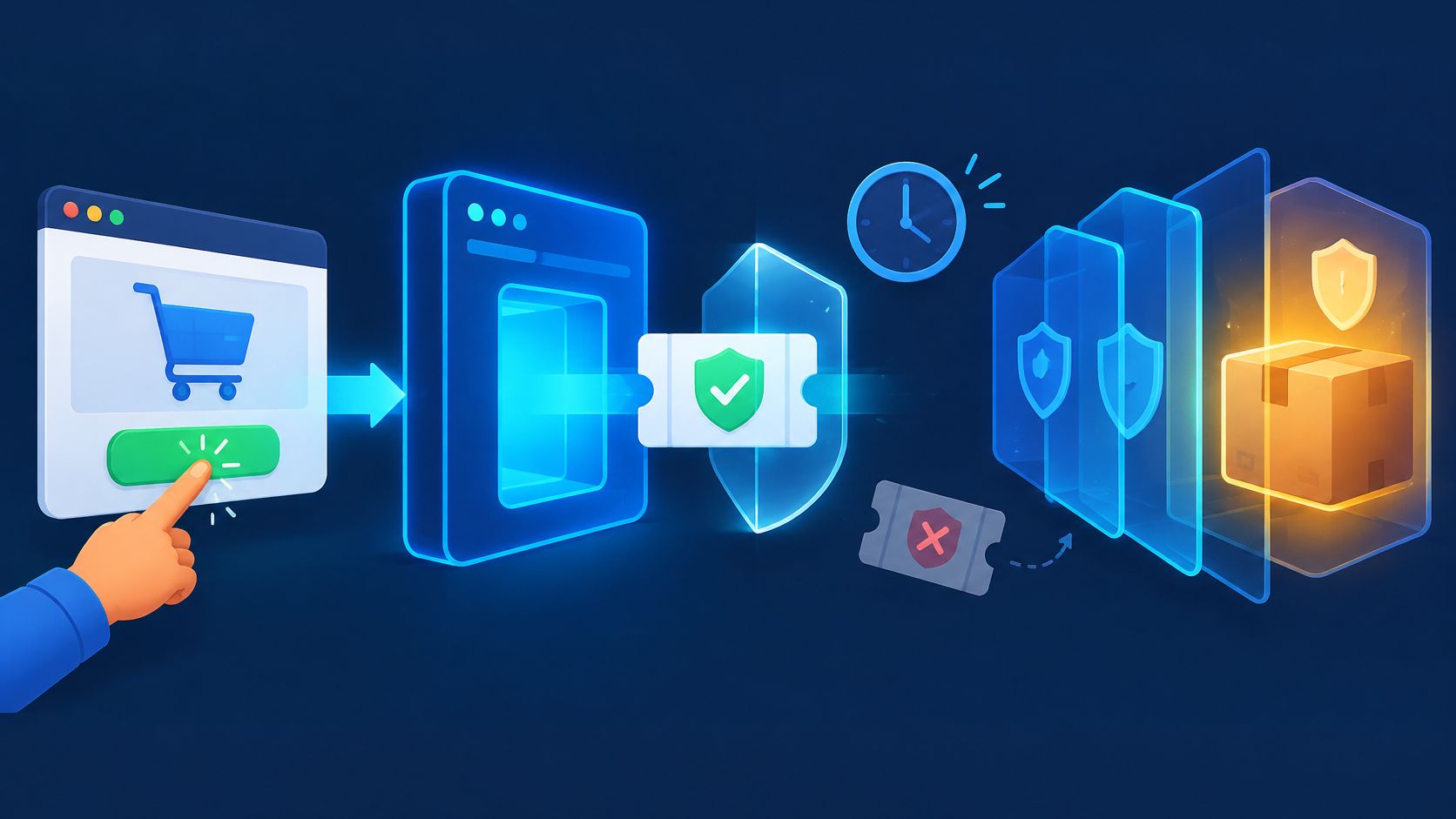
Fraud prevention APIs address different parts of an abuse problem: identity checks, transaction risk, account signals, or browser-originated requests. Browser verification is one layer. It checks request proof against server-side state before a protected action proceeds; it does not establish identity or approve a payment.
A login proves something narrow at one moment. It doesn't prove that a checkout submitted later is fresh, that a promotion code hasn't already been redeemed, or that captured proof isn't being sent again from another client. A script can reuse valid credentials, copy browser material, or repeat a request that already succeeded. Each failure looks different in logs, and each needs a different control.
The practical design binds verification to one action and current server state. The browser collects short-lived proof for signup, sign-in, recovery, checkout, a reservation, or promotion redemption. The server checks that proof before committing the action. Authentication, authorization, rate limits, idempotency, and payment controls still own their separate decisions.
What a Fraud Prevention API Decides
A fraud prevention API exposes a particular risk or verification capability to an application. Its decision depends on the service: a payment-risk API assesses transactions, an identity API checks identity evidence, and a browser-verification API checks evidence about a browser request. This guide focuses on that last layer and the controls it complements.
Four questions often get collapsed into one vague trust decision. Did the browser request carry valid proof? Is that proof fresh and unused? May this account perform the action? Has the business operation already happened? Separating those questions prevents a common error, where a correct password becomes standing permission for every later route.
Which Control Answers Which Question
| Question | Control that answers it | What that control does not prove |
|---|---|---|
| Did this browser request carry current proof | Hosted browser verification | Human identity or payment approval |
| Is that proof unused and bound to this action | Server-side freshness and one-time use | That a later route is safe |
| May this account perform the action | Application authentication and authorization | That the request was not replayed |
| Has this business operation already completed | Application idempotency | That the browser was genuine |
| Is the payment itself fraudulent | Payment provider and transaction checks | Anything about browser proof |
The scale explains why password validity alone isn't enough evidence. Verizon's 2025 Data Breach Investigations Report analyzed 22,052 real-world security incidents, including 12,195 confirmed breaches, and found credential abuse involved in 22% of breaches, making it the leading initial-access vector in the report. Exploitation of vulnerabilities accounted for 20% of breaches in the same report. Attackers don't always break authentication. They often use authentication material that looks valid.
That's why a verification result has a narrow meaning. Browser proof does not grant an account or permission, and it doesn't authorize a transfer or approve a financial transaction. The application must validate permissions and operation details independently. MANDATE doesn't claim that adding browser verification establishes regulatory compliance, identity assurance, or payment-fraud protection.
A correct password can still be the wrong evidence for the next request.
A useful test is simple. If a request carries no current proof, carries proof for a different action, or reuses consumed proof, the application shouldn't treat an earlier login as a substitute. Server state has to answer for the action in front of it, not for an action that succeeded minutes earlier.
Browser Proof and the Evidence Around It
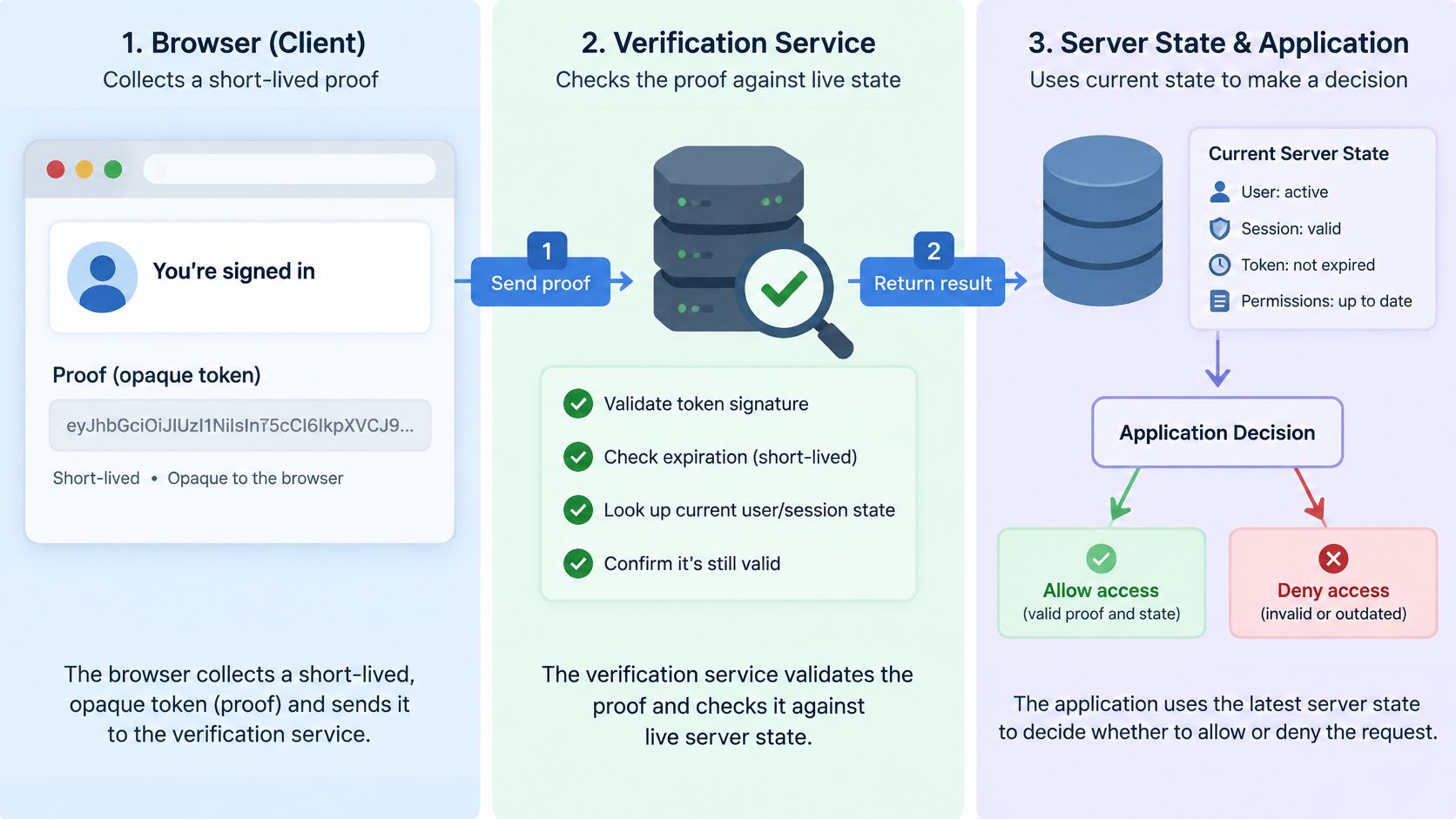
Browser proof is a short-lived, opaque credential collected in the browser and checked by hosted verification against current server state. Opaque means the application doesn't parse its contents to decide trust. The credential works as a reference, and the verifier checks whether the referenced state is current, unused, and bound to the intended action.
The coat check analogy helps, within limits. Proof is a ticket for one action. It isn't a passport that proves identity, and it isn't a receipt showing an order was paid. A ticket presented twice, after expiry, or at the wrong counter shouldn't work. The server-state note on why browser proof needs server state explains why the ticket has value only when the server can look up what it issued.
 Edit Alt Text
Three Kinds of Evidence Buyers Hear About
Browser proof: The short-lived credential itself, collected for a named action and verified on the server before the application commits anything.
Environment and request-integrity evidence: Signals about the browser context and whether the submitted request still matches the proof that was issued, supporting a decision on one route.
Behavioral analysis: Patterns of interaction over time, as the term is commonly used in the market. Teams shouldn't assume every vendor means the same thing by it, or that it's part of a given product.
Public MANDATE materials support a specific scope. The service analyzes browser environment and request-integrity evidence to support route-scoped decisions, without asking visitors to complete CAPTCHAs, puzzles, or a branded challenge. That statement shouldn't be stretched into claims about behavioral biometrics, raw fingerprints, or a general bot score. Those aren't the described mechanism, and treating them as interchangeable makes evaluation harder, not easier.
Coverage has an equally clear boundary. Browser verification applies to browser-originated routes whose callers can take part in the browser flow. A person submitting a signup form or checkout can participate. A webhook from a payment provider can't, and neither can a service client calling a machine API. Machine APIs stay outside browser coverage, so those callers need their own authentication, signing, and authorization controls instead of a browser check forced onto them.
Say a team protects only login and then issues a reusable trusted token for the session. A later password change, recovery request, or promotion redemption inherits trust it never earned. The gap isn't theoretical. Each high-value action needs its own current proof, checked against state at submission time. Otherwise the system has verified a browser once and guessed about everything after it.
Separate Abuse Problems and Their Controls
A common buyer mistake treats every automated login attempt as an account takeover. The terms describe different stages and failures. Mixing them up leads to controls placed on the wrong route, dashboards that count unlike events together, and policies that block retries while missing replay.
Credential stuffing is the use of username-and-password pairs from earlier breaches to attempt access. Account takeover starts later, when an attacker uses an account after access already exists. Session or token theft is reuse of stolen session material. Replay is retransmission of a prior proof or message. A legitimate retry after a lost response is none of those things, and it belongs with idempotency.
Abuse Types That Need Different Controls
| Problem | What it is | Primary controls | Do not confuse it with |
|---|---|---|---|
| Credential stuffing | Reused username and password pairs from earlier breaches | Per-account and per-IP limits, MFA, one-time recovery links, browser evidence on that sign-in | An account already taken over |
| Account takeover | Use of a compromised account after access exists | MFA, session management, recovery, and authorization | The stuffing attempts that came before access |
| Session or token theft | Stolen session or token material presented again | Secure session storage, rotation and server-side revocation, reauthentication for sensitive changes, and additional action-scoped checks | A login token treated as permission for every later route |
| Replay | A previously observed proof or message sent again | Freshness, nonce or one-time use, action binding | A customer retry after a lost response |
| Trial eligibility abuse | Repeated new-account attempts aimed at a trial or promotion | Action-scoped checks on account creation and redemption | Misleading billing or cancellation practices |
The account lifecycle is wider than the login form. Akamai's 2026 digital fraud and abuse report identifies login, password reset, verification, account updates, and password changes as connected attack stages, and verification requests alone represented 40% of high- or critical-risk login traffic in that data. Protecting only the first stage leaves the connected stages to absorb the same scripted traffic.
Scale matters after access, too. Account-takeover attacks increased by 250% in 2024, according to Kasada's 2025 Account Takeover Attack Trends Report. MFA, account risk checks, session management, and recovery controls remain responsible for account security. Browser evidence on a sign-in doesn't replace them, and MFA alone doesn't remove automated abuse of reset, verification, and update flows.
Practical coverage follows the action, not the label. Merchant teams reviewing storefront basics can protect your Shopify store as a starting point for general hygiene, while engineering teams need route-level controls for each abuse type. The broader pattern is covered in the guide to API abuse on browser-originated actions. Webhooks and machine APIs don't take part in a browser verification flow and should stay outside browser-only coverage, with their own signing and authentication instead.
Practical rule: name the failure before choosing the control, because stuffing, takeover, theft, and replay fail at different points.
How to Connect One Protected Route
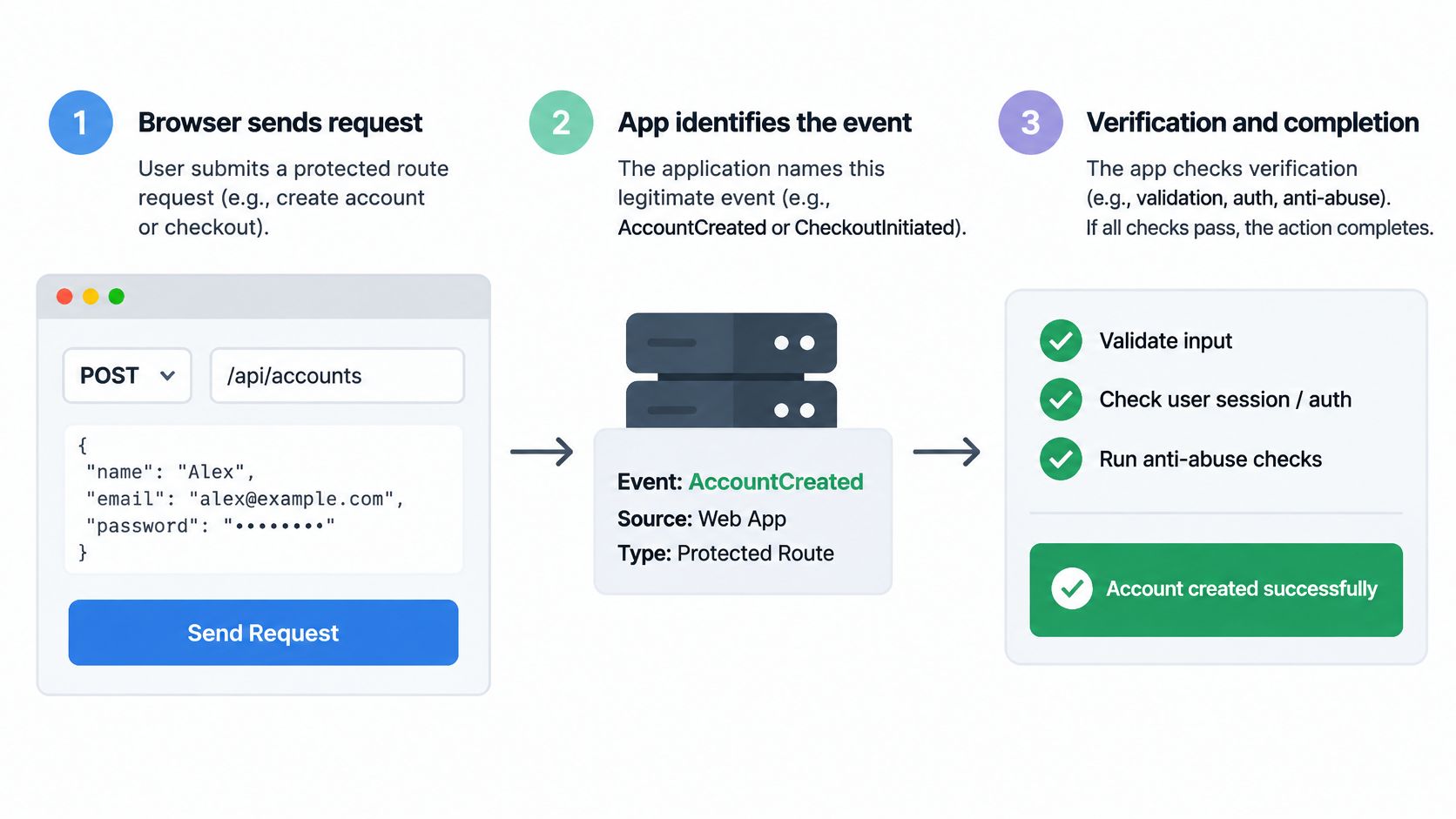
One route is enough to learn whether verification fits. The sequence below keeps browser proof, identity, and the business operation in separate steps, so a failure in one doesn't get papered over by another.
The Seven Steps in Order
Choose one route and method: Pick a browser-originated action such as POST account creation or POST checkout, and name the application event that means a legitimate request completed. Without a completion signal, there's no honest way to measure impact later.
Inventory the callers: List every client that calls the route. Leave webhooks and machine APIs outside browser-only coverage, since they can't take part in the browser flow.
Collect proof in the browser: Gather proof for that specific action at submission time, not once at login for reuse everywhere.
Verify on the server: Call hosted verification and treat the opaque credential as a reference to server state. The application shouldn't parse it to decide trust.
Apply identity and authorization: Check authentication and permissions in the application, independently of the verification result.
Commit the operation: Only then run the business operation, with its own idempotency key recorded atomically with the result.
Handle errors explicitly: Decide retry behavior in advance and review the business outcome separately from the verification outcome. An error isn't a verified result.
 Edit Alt Text
Freshness is the reason step four exists. NIST SP 800-63B authenticator guidance defines a replay-resistant process as one in which recording and retransmitting a prior authentication message is impractical, using verifier-generated nonces, challenges, or timeliness data so the server can detect stale messages. Encryption and HTTPS protect data in transit. They don't stop a captured message from being sent again.
For browser verification, evaluate whether the integration checks expiry, consumption state, and the intended route or session context. Application idempotency separately records business-operation identifiers and outcomes. Confirm each guarantee in the current integration rather than assuming every fraud API provides it.
Behavior when verification is unavailable depends on the integration and policy, and it must be designed and tested before launch. Treating an error as verified removes the control at the exact moment it fails. Failing closed without a support path can lock out legitimate customers during an outage. Either choice needs testing, logging, and an escalation route.
The same discipline applies to any external dependency added to a route. Teams integrating third-party services into checkout, for example, can treat a developer's guide to compliant WooCommerce shipping as a model of documenting route behavior, inputs, and failure handling before enforcement. For verification specifically, the research note on retries, replay, and business outcomes sets out where a retry ends and a new business operation begins. The four-step shape stays constant throughout, browser request, verification evidence, identity and authorization, and application decision.
A Synthetic Checkout With Two Boundaries
The following example is synthetic. It isn't a customer result, and the order number is invented to make the sequence concrete.
A shopper submits checkout with short-lived proof bound to that checkout action. Hosted verification accepts the proof. The application checks authorization, creates order 1042, and stores an idempotency key with that order. The HTTP response is then lost before the shopper sees a confirmation page.
The shopper retries with the same business intent after a timeout. The application authenticates and authorizes access to the original operation and uses its recorded idempotency key to return order 1042. If the protected execution path requires new browser proof, it obtains fresh proof rather than treating the consumed proof as reusable. The order result and payment-provider idempotency must be reconciled so a lost response cannot cause a second charge.
A second caller behaves differently. It replays the captured proof bytes from the first submission, hoping the application will accept them as a new checkout. The verifier rejects that proof as already consumed. RFC 7616 describes a comparable pattern using timestamped nonces tracked server-side until expiration, where a reused nonce is rejected and the bounded validity period limits the attack window. That's an analogy for freshness tracking, not a description of any product protocol.
Replay rejection asks whether the proof was reused. The idempotency key asks whether the business operation already happened.
Neither control substitutes for the other. Replay rejection alone can't prevent a double charge, because the verifier doesn't own stock, payment, or the order row. An idempotency key alone can't identify stolen proof, because it records operations rather than judging browser evidence. Removing either layer leaves a named gap that the remaining layer wasn't built to close.
Rate limits form a third layer with a third job. They constrain repeated attempts per account, session, network, and action. That matters for a low-and-slow script that stays under simple per-request thresholds while testing many accounts over hours. Verification judges the proof on one request, idempotency protects the side effect, and rate limits constrain volume across requests. A checkout that needs all three isn't over-engineered. It's answering three different questions.
When Observation Is Enough to Enforce
The enforcement decision isn't whether bots exist. It's whether evidence on this route supports blocking or stepping up real requests. That evidence comes from starting in Observe mode on one named action, recording proposed outcomes without treating them as blocks, and watching what would have happened to legitimate customers.
Four events must stay distinct in any dashboard. A proposed rejection is a decision recorded in Observe mode. A verification error is a failed check, not a rejection. An applied intervention is a block or step-up that reached a customer. A failed business operation means the order, signup, or recovery didn't complete, whatever verification said. Counting only verification calls hides the number that matters: completed legitimate actions.
What to Review Before Enforcing
Legitimate-user cohorts: Corporate proxies, privacy-preserving browsers, accessibility tooling, and mobile handoffs can produce unusual evidence without abuse.
Grouped evidence by action: Signup patterns and checkout patterns differ, so a policy tuned on one route shouldn't be copied to another.
Quiet periods: A quiet week isn't proof the control is unnecessary, and a spike isn't proof every automated client is abusive.
Rollback readiness: A written rollback path, tested unavailable-verification behavior, and a support escalation route should exist before enforcement starts.
The sign-in baseline still applies alongside browser evidence. OWASP Cornucopia guidance defines credential stuffing as using username-and-password pairs exposed in earlier breaches to attempt unauthorized access, recommends account lockout or rate limiting, and specifies that account-recovery reset links should be unique and usable only once. Browser verification adds evidence about the request. It doesn't replace those controls.
The Observe before enforce research note describes that rollout boundary in more detail. Sensible evaluation criteria follow from it, an action-scoped policy, opaque short-lived credentials, hosted verification as the normal path, explicit error handling, no user-facing challenge, machine clients excluded, and no claim of complete detection. Local cryptographic verification stays an offline emergency and legacy path, not the default integration.
The comparison with CAPTCHA is straightforward. A CAPTCHA adds a visible challenge that every flagged user must solve. Hosted browser verification adds no user-facing challenge, but it still needs rollout testing, explicit error handling, and rate limits beside it. The service can't guarantee that all abuse will be detected or that every legitimate request will be accepted, which is exactly why enforcement waits for route-level evidence and a confirmed rollback path.
Start With One Action in Observe Mode
Some gaps need a different tool entirely. Identity document checks, synthetic-identity detection, a payment-fraud score, a WAF, and DDoS filtering each answer questions this API doesn't ask. Buying browser verification for those problems produces a control that can't succeed at its assigned job.
The right gap is narrower. Scripted abuse of one browser action, signup, sign-in, account recovery, or checkout, is where action-bound proof and server-side freshness checks apply. MANDATE Verify verifies the browser behind sensitive actions without CAPTCHAs, and browser verification covers sign-in, account creation, checkout, and other actions the application needs to protect while staying invisible to the person using it. It isn't a general bot blocker, identity proof, or payment-fraud engine. Verification can't guarantee every abuse is detected or every legitimate request is accepted, and customers still own accessibility and user obligations.
The next step is procedural, not promotional. Pick the single route, confirm its completion signal, inventory its callers, and decide unavailable-verification behavior before any enforce switch. Where a Node.js managed SDK fits, its mandate.verify wraps a server action or route handler to protect it. Run Observe mode on that route first, and let measured evidence make the enforcement case.
MANDATE protects important website actions from automated abuse without CAPTCHAs, checking short-lived browser proof on the server before an application accepts signup, sign-in, recovery, or checkout requests. Teams evaluating a fraud prevention API for one high-value route can start in Observe mode, measure legitimate completion, and enforce only when the evidence supports it. Visit MANDATE to review the approach and connect one protected action.