
Blocking every automated request isn't anti web scraping. It's a blunt sitewide rule that breaks useful automation while leaving the actions attackers want exposed. A browser that loaded a page cleanly can still be scripted to create accounts, test passwords, or hold reservations. Protection has to follow the browser-originated state change, the request that creates, reserves, redeems, or changes something, not just the page view before it.
What Anti Web Scraping Protects Now
Anti web scraping should make decisions at the point a browser changes application state. For product and security teams, that means accepting, challenging, or rejecting a request based on current evidence tied to the action. A public page fetch and a request that creates an account are different security events.
A search indexer fetching a catalog page, an uptime monitor checking a status endpoint, and a script submitting a signup form carry different risks. Apply separate policies, or noisy blocks can coexist with weak protection.
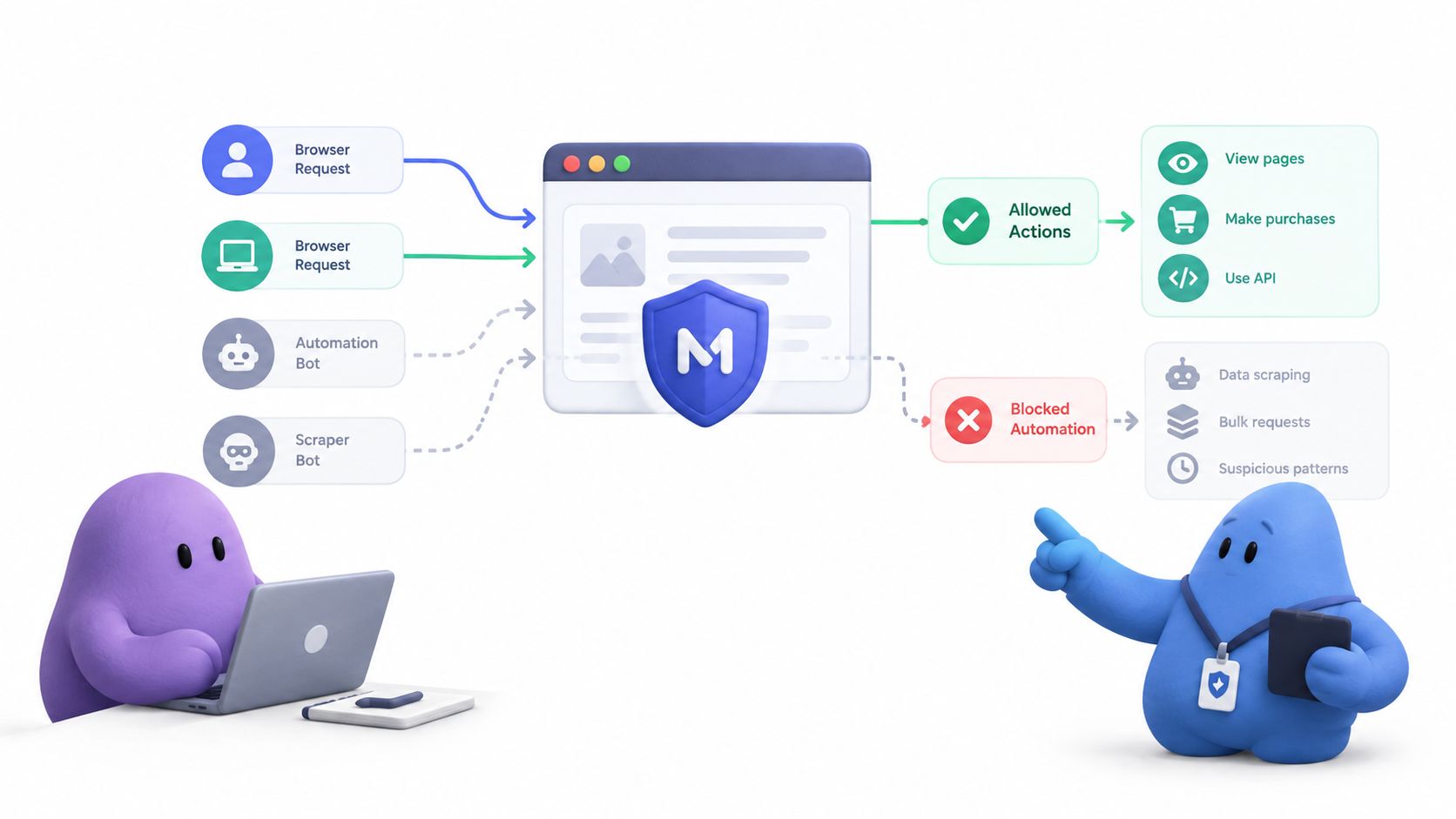
Where the value sits
Prioritize mutations: account creation, sign-in, account recovery, checkout, reservations, and promotion redemption. Each can turn a browser session into an account, order, held seat, or spent discount. These actions affect application state, so they warrant checks that a routine page view does not.
A challenge passed on an earlier page load does not establish that a later checkout request is safe. The session may have changed hands, the proof may be stale, or the request may be replayed. Validate freshness against current server state, as explained in why browser proof needs server state to stay meaningful. Browser proof helps assess whether the action came through a credible browser flow. Rate limits constrain attempt volume, while authorization and idempotency remain application responsibilities.
Detection gaps at this layer are common. A 2026 assessment of tested popular websites reporting 65.3% failed to detect any of 10 simulated bot types, while only 2.4% blocked or challenged every type also identified average-complexity browser bots in scraping, fake-account, and credential-testing campaigns. Ordinary browser automation can target business logic without resembling exotic malware.
A synthetic example
Synthetic example, not a customer case. A scripted browser visits a small shop, loads product pages at a human pace, and builds a plausible session. It then creates accounts, tests recovered passwords at sign-in, and tries promotion codes at checkout. Page-view volume stays unremarkable, so crawler rules focused on request volume may miss the abuse.
Bulk extraction of public content still deserves controls, such as rate limits or restrictions on repeated reads. Measure that work separately from business-logic abuse: reducing catalog scraping does not show whether account creation or checkout is protected. For context on how website bot traffic mixes useful and abusive automation, consider how the same site can receive both kinds of automated traffic.
A page load proves a page loaded. It doesn't prove the next signup, recovery, or checkout request deserves acceptance.
Keep the controls distinct in implementation and reporting. Classification labels the activity, rate limits constrain attempts, replay checks reject reused requests, and browser proof informs whether to challenge a selected action. None of these controls decides whether an account is authorized to place an order or guarantees that a state change happens only once. The application must enforce those rules.
Sort Scraping from Credential Abuse
A page-view rule cannot protect every state change that follows a visit. Signup, login, recovery, checkout, reservations, and redemption create different risks from reading public catalog pages. Classify the action and the asset it changes before choosing a control. Otherwise, a team can count blocked requests without knowing whether it protected anything that matters.
For one route, name the action and record its requests, sessions, accounts, and outcomes. Group activity by stable server-side identifiers, such as account ID, session ID, order draft, or redemption record. An IP address is useful context, not a reliable identity.
Use separate threat labels
OWASP distinguishes scraping, systematically reading accessible paths and parameters to collect responses, from adjacent automated threats such as credential stuffing and credential cracking. That distinction changes what a useful alert looks like. Fewer catalog reads say little about whether attackers are still testing passwords against login endpoints, a pattern described in this guide to credential stuffing attacks on login endpoints.
IP-only thresholds also blur separate behaviors. NAT, mobile networks, corporate proxies, and residential proxy rotation can put legitimate users behind one address or spread one attacker across many. Treat IP reputation as supporting evidence. It should not decide by itself whether an application accepts a state-changing request.
- Content scraping: Repeated reads across catalog URLs, search parameters, or listing pages, with few state changes and little interest in outcomes beyond the response body.
- Credential abuse: Repeated sign-in or recovery attempts, clustered failures, and password testing across accounts.
- Account and inventory abuse: Signup, checkout, reservation, or redemption submissions that create business objects rather than merely reading them.
One synthetic shop, three patterns
Synthetic example, continued. A shop sees a crawler walking public catalog URLs in order. At the same time, sign-in failures spread across many accounts, while account creation receives a burst of submissions that do not browse normally afterward. These patterns need separate response paths. A single bot score conceals whether the issue is extraction, account access, or changes to business state.
Measure evidence per action. Useful signals include abnormal path traversal, request velocity, repeated failures, and impossible action sequences, such as a checkout submission before a cart exists. A browser check can supply evidence about a particular request; it does not grant authorization, set an attempt budget, or make a repeated submission safe. The application still decides whether the user can perform the action and whether a repeated request can create duplicate effects.
Practical rule: Don't enforce a signal that hasn't been measured against legitimate completion on the same action.
Measure per action, not per site
Blocked-request volume is easy to inflate and tells little about business impact. Track precision, recall, false-positive rate, challenge or denial rate, and business completion for each protected action. A policy that protects catalog reads while rejecting legitimate recovery attempts is failing, regardless of its block count.
Keep ownership aligned with the behavior. Authentication monitoring owns login and recovery, with its own alerts and response path. Scraping review owns read-heavy paths and extraction patterns. For signup, checkout, reservations, and redemption, product and backend teams must also check whether accepted requests change the intended business state. Separate labels and action-level outcomes let each team tune enforcement without hiding another team's problem.
Pair Rate Limits with Replay Checks
Browser-originated state changes need more than a crawler block. Signup, login, recovery, checkout, reservations, and redemption each create different risks. Four controls address separate questions: how much a client can attempt, whether it fetched server-issued state, whether proof has been reused, and whether an operation has already taken effect. The application still owns the decision to allow the action.
Rate limits cap attempts or resource use on a route. Apply them across relevant dimensions, such as account, username, IP or network, device or session, and action. Track failed authentication separately from successful traffic. Combining them can hide guessing activity inside normal sign-ins.
Attempt budgets matter even when each guess seems unlikely to succeed. NIST models a value with approximately 20 bits of entropy as having a one-in-one-million chance of success per guess, and notes that 100 guesses produce an approximate one-in-10,000 success chance. NIST also says a verifier should limit consecutive failed attempts for one authenticator on one subscriber account to no more than 100, unless an authenticator-specific rule sets another limit.
Friction is not proof
A preliminary server-issued token, such as a CSRF token required before credential submission, makes a script fetch a page before it can submit credentials. This adds work for simple stuffing tools. It does not establish that a person is present, so record it as a check that passed, not as proof of a human.
Keep failure responses uniform. If the response distinguishes a wrong password from a nonexistent account, it gives attackers an enumeration oracle. Apply the same care to rate-limit messages.
What each control decides
| Control | Question it answers | What it does not prove |
|---|---|---|
| Rate limit | Has this actor exceeded an attempt or resource budget? | That permitted attempts came from a legitimate user |
| Preliminary token | Did the client fetch server-issued state before submitting? | That a human performed the action |
| Replay check | Has this proof already been accepted during its validity window? | That the order or reservation committed |
| Idempotency key | Has this exact operation already been processed? | That the requester was authorized to run it |
Replay protection rejects a captured proof after its first successful use. Make the credential short-lived, bind it to the intended operation, and mark it consumed after verification. A fresh, unused proof says nothing about whether inventory remains available, payment cleared, or a redemption succeeded. Those outcomes belong to application logic.
Idempotency protects the operation's effects. It prevents a repeated checkout or reservation request from creating duplicate orders or holds. A customer may retry after losing a response; an attacker may replay a captured proof. The distinction changes the right business outcome, as explained in how retries and replay differ in business outcome handling.
A consumed token blocks reuse of proof. An idempotency key blocks duplicate effects. Use both: attackers may replay requests, while customers may retry them.
None of these controls grants permission. The application must still perform authentication, authorization, transaction validation, and payment-provider checks. Rate limits govern attempt volume, replay checks establish proof freshness, and idempotency protects the resulting operation. The business rules decide whether the state change is allowed and whether it succeeded.
Choose Browser Proof over Raw Fingerprints
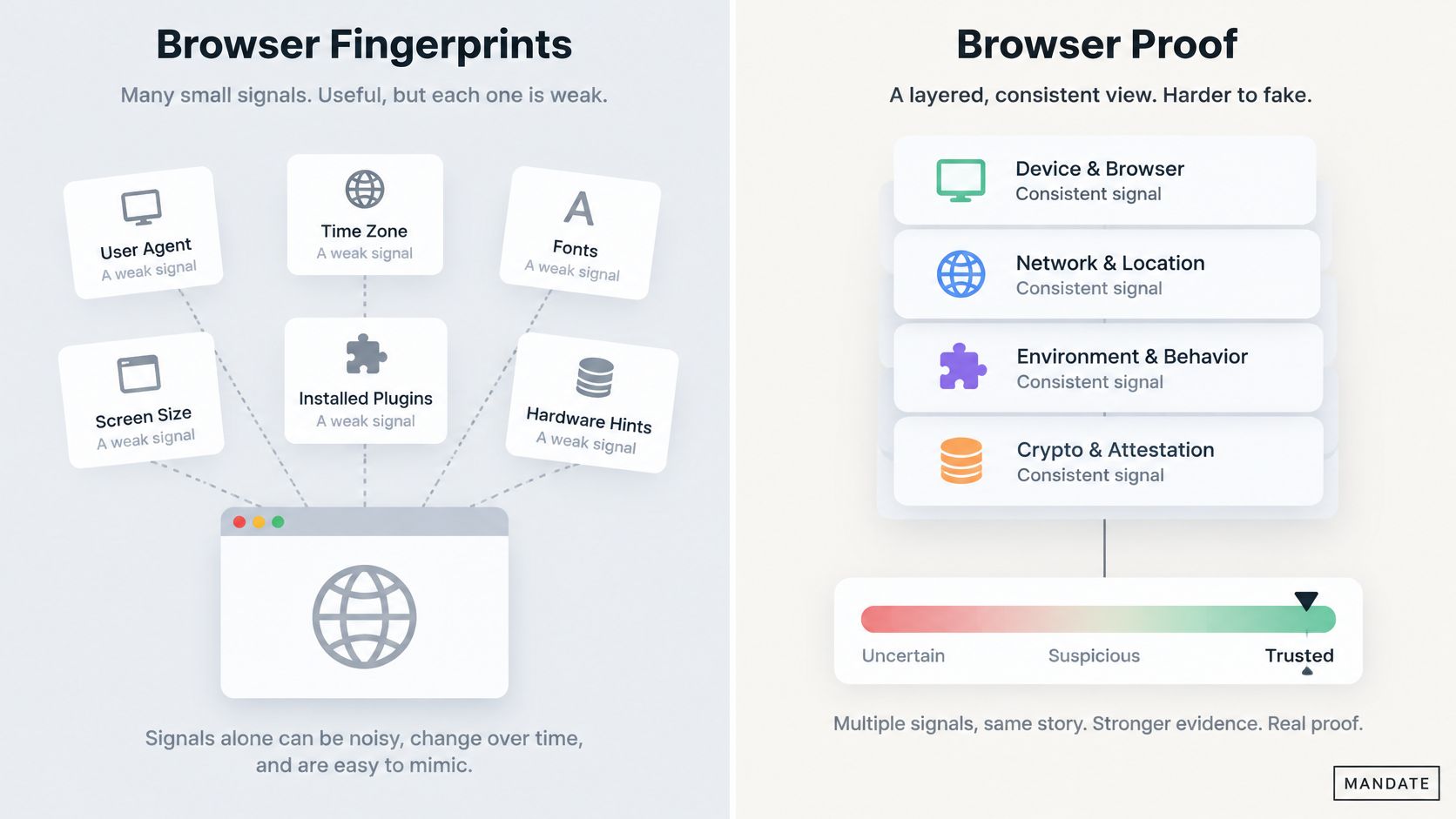
Page-level bot detection is a weak proxy for protecting important actions. A measurement of the top 100,000 sites on the Tranco list found bot-detection logic on 14% of front pages (study of bot detection on popular websites). The researchers also found that observing access to browser properties can misclassify ordinary activity: scripts may inspect WebGL or other capabilities for compatibility.
For signup, login, recovery, checkout, reservations, and redemption, the decision belongs at the action boundary. Browser signals can contribute evidence, but they do not prove a person is present. A script touching a property might be a detector, a compatibility check, or a rendering library. Loose feature rules can therefore reject legitimate browsers without establishing that a state change is safe.
Why blocklists fall short
User-agent and IP blocklists have a classification problem. Automated traffic includes abusive scripts, search indexing, monitoring, and partner integrations. Some requests also come from legitimate cloud hosting. Blocking a provider's address range or a declared browser string can disrupt useful traffic, while attackers rotate addresses or copy common browser identities.
A scripted browser can send a mainstream user-agent, run a real rendering engine, and execute page scripts. Client-declared identity is cheap to fake, so it should not decide whether a sensitive action proceeds.
Where passkeys fit, and where they stop
Passkeys provide origin-bound, phishing-resistant authentication. A credential created for one site cannot be replayed to a lookalike domain, making passkeys a strong account-takeover defense where they fit.
They do not cover every browser-originated action. Passkeys cannot stop automated signup before an account exists, checkout scripting, reservation hoarding, or abuse within an authenticated session. Authentication establishes who holds a credential. It does not establish that each later action came from an unscripted browser.
The browser-proof option
Hosted browser verification checks a different signal at the point of action. A browser script gathers proof before a protected request, and a hosted verifier checks it against current server state before the application accepts the request. The application receives credentials that are opaque and short-lived, rather than raw detection internals to interpret.
MANDATE offers this approach for selected browser-originated actions without CAPTCHAs, checkboxes, puzzles, or interstitials. Hosted verification is the standard integration path. Local cryptographic verification is limited to an offline emergency tier and legacy compatibility.
Browser proof has clear limits. It is not a WAF, CDN, DDoS service, or payment-fraud engine, and it does not prove humanity or stop every real-browser agent. It raises the cost of scripted abuse at selected actions. The application still decides authentication, authorization, and whether the requested transaction is valid; rate limits and idempotency address separate risks.
Tune Enforcement from Observe Mode
Enforcement is a policy decision, not a substitute for measuring impact. Turning it on before checking real traffic can block legitimate browser-originated actions and reveal the problem only through support tickets. Observe first, then decide against telemetry.
Start with one named route and method. List every expected caller, including mobile clients, partner integrations, and internal tools. Define the application event that confirms a legitimate outcome, such as an account being created, an order confirmed, or a reservation held. That event lets the team compare policy proposals with completed business operations.
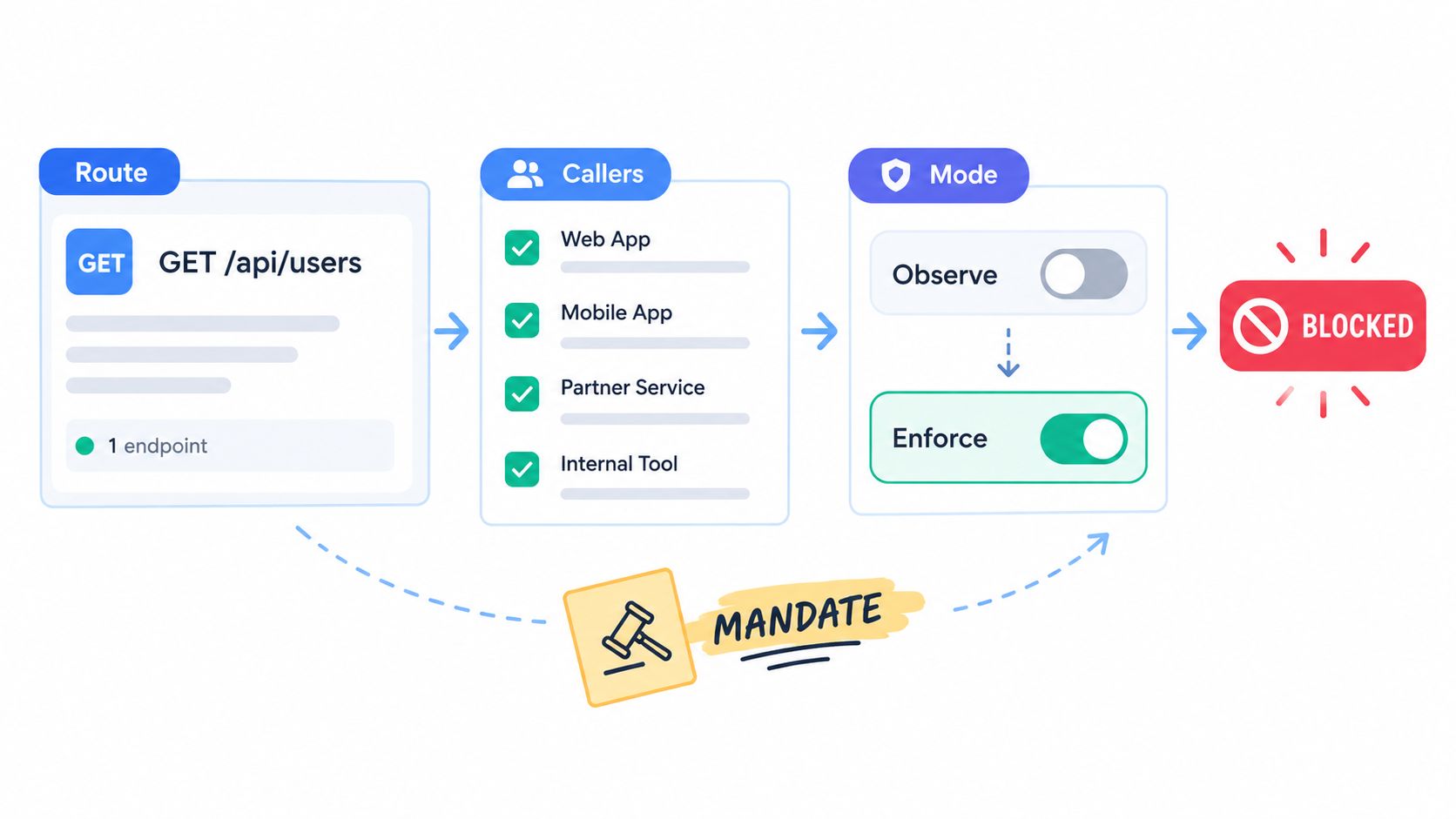
Keep four counts separate
In Observe mode, the system records evidence and proposes an action without applying it. A proposed rejection is not a block. Keep four outcomes distinct:
- Proposed rejection: The policy would deny the request if enforcement were enabled.
- Verification error: The proof check failed, timed out, or could not be evaluated.
- Applied intervention: Enforcement challenged, flagged, or rejected a request.
- Failed business operation: The application rejected the action for a reason such as invalid input or payment failure.
Combining these counts obscures conversion impact and control failures. Rising verification errors call for an infrastructure fix. More proposed rejections alongside steady successful completions may support enabling a narrow policy, but the result still needs review. The observe-before-enforce rollout guidance explains how to evaluate this sequence.
Respect the automation mix
Sitewide deny rules risk blocking wanted automation as well as abuse. DataDome reported automated traffic represented 53% of observed web traffic in 2025, with bad bots accounting for 40%. The same report found more than 10% of AI fetcher sessions and nearly 9% of AI crawler sessions triggered bad-bot classifications. It also reported that Chrome was declared by 41% of bad-bot traffic in 2025.
Automation can serve search, accessibility, monitoring, partner integrations, or AI retrieval. Other sessions imitate common consumer browsers. A declared identity or an automation signal alone cannot establish whether a request is safe. Browser proof informs that decision; it does not replace authorization, rate limits, or the application's transaction checks.
Enforce narrowly at high-risk mutations. A checkout policy should not become a sitewide rule against automation.
Group observed evidence by action and actor, then compare legitimate-use samples with known-abuse samples. Review completion rates for the specific route before enabling a policy. The application remains responsible for authentication and authorization, and real-browser agents may still pass the browser check.
Roll Out One Protected Action
A safe rollout starts with one browser-originated state change, not a sitewide crawler rule. Choose an action with a clear abuse cost, instrument its legitimate outcome, and keep rollback scoped to that route.
The one-action checklist
- Pick one action: Select signup, login, recovery, checkout, reservation, or redemption.
- Define its contract: Record the route, method, expected callers, and application event that confirms legitimate completion.
- Check existing controls: Confirm rate limits and idempotency already cover request volume and duplicate submissions. Browser proof does not replace either.
- Run Observe mode: Collect proof and hosted-verification results without enforcing. Compare those results with application outcomes.
- Review the impact: Group evidence by action and actor. Check legitimate completions before enabling the policy.
Keep each decision separate
The browser supplies proof, the hosted verifier checks it against current server state, and the application decides whether to proceed based on that result. This verifies the browser request; it does not establish user identity, grant access, validate a transaction, or decide whether a payment should be accepted. The application must continue to perform authentication, authorization, transaction validation, and payment-provider checks on every request.
Local cryptographic verification belongs to an offline emergency tier or legacy compatibility. It is not a substitute for the hosted path when designing a new rollout.
Make rollback just as narrow as enforcement. Disabling the policy for one protected action should leave unrelated routes, sessions, and application logic untouched. If turning it off requires a sitewide configuration change or deploy, the rollout is scoped too broadly.
Scoping test: Can the policy be disabled for this action without affecting anything else? If not, do not enforce it yet.
Use the Observe-before-enforce process referenced earlier, then instrument one action and review its outcomes. Set expectations clearly: this rollout cannot promise complete protection, a specific reduction in fraud, or a conversion gain. It can show how the control behaves on that action before real users encounter enforcement.
MANDATE verifies browser proof against current server state for selected actions, with Observe mode available before enforcement. It sits alongside rate limits, idempotency, and application authentication, rather than replacing them.