
A signup form can be technically healthy and still lose legitimate users. A mobile visitor reaches the final step, receives an image challenge, fails to identify a blurry object, and leaves. Meanwhile, a scripted client sends requests directly to the backend and never sees the challenge at all. The team responds by tightening a score threshold, which catches some automation but creates more support tickets.
That pattern points to a deeper decision than whether to keep or remove a CAPTCHA. A reCAPTCHA alternative should be evaluated as a verification architecture. The important questions are where browser proof is created, how long it remains valid, how the server verifies it, and what happens when traffic looks suspicious.
| Verification approach | Human interaction | Primary trust signal | Server control | Typical operational trade-off |
|---|---|---|---|---|
| reCAPTCHA v2 | Checkbox or visual challenge | Challenge result and vendor response | Server verification endpoint | Familiar ecosystem, but visible friction and external dependency |
| reCAPTCHA v3 | Usually invisible | Behavioral score | Server verification endpoint | Low routine friction, but scores can be difficult to interpret |
| hCaptcha | Checkbox or visual challenge | Challenge result and vendor response | Server verification endpoint | Privacy-focused positioning, with possible accessibility and completion costs |
| Cloudflare Turnstile | Usually invisible | Managed browser and interaction signals | Server verification endpoint | Convenient for teams already using Cloudflare, with less control over detection detail |
| MANDATE | Invisible | Fresh browser proof | Server-side validation and policy decision | More architecture ownership, without puzzle challenges |
Table of Contents
- When reCAPTCHA Stops Being the Default
- The Criteria That Matter for a reCAPTCHA Alternative
- Comparing reCAPTCHA, hCaptcha, Turnstile, and MANDATE
- How Invisible Browser Verification Integrates With Your Stack
- Matching the Alternative to Your High-Value Actions
- Rolling Out a reCAPTCHA Alternative Without Blocking Real Users
- Choosing the Right reCAPTCHA Alternative for Your Team
When reCAPTCHA Stops Being the Default
A mid-sized SaaS team often discovers the problem through production symptoms. Signup conversion falls for mobile Firefox users. Support receives reports from legitimate customers who are repeatedly asked to identify images. Meanwhile, the bot queue grows because the v3 threshold configured last quarter no longer separates scripted traffic from genuine visitors.
Changing the threshold or switching challenge types may reduce the symptoms for a while. It does not resolve the trust boundary. reCAPTCHA combines behavioral assessment, challenge selection, and a browser-side integration delivered through Google's infrastructure. Each layer creates a separate failure mode: the application team may not be able to interpret a score, a challenge may exclude users with accessibility needs, and a third-party script may sit directly on the signup path.
The better question is what your application accepts as proof that a browser request deserves access. That makes a reCAPTCHA alternative a verification-architecture decision, not just a CAPTCHA-or-no-CAPTCHA decision. Server-side validation of fresh browser proof should be the dividing line in the comparison. A visible puzzle can be one input, but the protected action still needs a server decision that checks whether the proof is valid, recent, bound to the right request, and used only once where appropriate.
CAPTCHA technology emerged as automated abuse became practical. Moni Naor proposed the computational distinction between humans and machines in 1996, AltaVista deployed an early practical CAPTCHA in 1997, and Carnegie Mellon researchers later popularized the acronym for “Completely Automated Public Turing test to tell Computers and Humans Apart.” The history, including the progression toward harder automated tests, is documented in the research on the evolution of CAPTCHA systems.
The friction problem is measurable
The original reCAPTCHA model had a useful secondary effect. People solved text challenges while their answers helped digitize books and archival material. Google acquired reCAPTCHA in 2009, then shifted the service toward image challenges and behavioral assessment.
That progression exposed a persistent trade-off. Google researchers reported that neural networks solved the hardest category of reCAPTCHA text challenges with 99.8% accuracy. As automated systems improved, providers made challenges harder, while legitimate users absorbed the cost through extra time, confusion, and accessibility barriers.
A large-scale academic study estimated that at least 512 billion reCAPTCHA sessions consumed about 819 million hours of human effort, valued at least $6.1 billion under the study's assumptions. It measured an average reCAPTCHA v2 completion time of 3.53 seconds. Checkbox challenges averaged a System Usability Scale score of 77, compared with 59 for image challenges, which participants described as annoying in the study's results.
Ask what the application trusts
Production review should answer four questions:
- Where is browser proof generated? Is it created by a browser context, a visible puzzle, or a behavioral score?
- Who can revoke it? Can the application reject stale, mismatched, or reused proof before creating an account or processing an order?
- What does the server trust? Does it validate a signed result, or accept an opaque client-side value?
- How is uncertainty handled? Can the system allow, flag, or block traffic without forcing the same decision on every request?
A vendor-neutral cybersecurity brokerage can help teams compare commercial controls without treating a familiar CAPTCHA brand as the default. The choice should follow the protected action, the team's ability to operate the integration, and the evidence available from real traffic.
The Criteria That Matter for a reCAPTCHA Alternative
A verification decision should start with the action being protected, the failure it must prevent, and the cost of getting that decision wrong. An account-creation control that stops automated registrations but blocks legitimate customers has failed operationally. An invisible service that allows scripted browsers to create accounts at scale has failed as a security control. The key question is architectural: where is fresh browser proof created, and how does the server validate it before the protected action runs?
Accuracy includes false positives
Measure outcomes against confirmed results from your own workflows. Detection recall shows how much relevant automation the system identifies. False-positive rate shows how often legitimate traffic is flagged. Segment both measures by browser, device type, geography, authentication state, and accessibility needs. A single average can conceal a serious failure affecting one customer group.
An independent benchmark evaluated five bot-detection systems across 5 real-world interaction tasks, 3 bot types, and 10 trials per task and bot combination. Each system produced 150 sessions, for 750 sessions overall, and detection rates ranged from 33% to 87%. Systems combining device and behavioral signals substantially outperformed device-only approaches in its methodology and findings. The result does not predict performance in your application. It does show why testing should separate replayed requests, scripted browsers, and higher-fidelity agents rather than treating all automation as one category.
Friction includes every interrupted action
Track visible challenges, failed submissions, abandonment, and the time added to important workflows. Review accessibility separately. A challenge that works for a desktop mouse user can create disproportionate difficulty for screen-reader users, mobile visitors, and people using unusual input devices.
A 13-month study involving more than 3,600 users measured mean solving times of 1.85 seconds for behavioral CAPTCHAs and 10.3 seconds for image challenges. Its cited comparison measured approximately 1.85 seconds for checkbox completion and 10.5 seconds for image completion in the study population. Reported usability scores were 77 for checkbox challenges and 59 for image challenges in the published research. The engineering measure is the cost of intervention across the full journey, not whether a puzzle appears on screen.
Token security sets the trust boundary
A token needs explicit security properties. Check whether it is short-lived, signed, bound to the expected origin or session, and validated by the server. The server should reject proof that is correctly formatted but stale, issued for another action, or presented from the wrong context.
NIST defines replay resistance as making authentication impractical through recording and replaying a previous message. Nonces and challenges provide freshness because the verifier can reject an old message that lacks data associated with the current session in its guidance on replay resistance. Fresh browser proof does not replace secure sessions, CSRF protection, HTTPS, or authorization checks. It adds a server-verified signal to those controls.
Integration determines operational cost
A widget API may be quick to install, but high-value actions need more than a front-end callback. Verify that the alternative offers a server verification endpoint, libraries or SDKs for the application's stack, origin allow-listing, event visibility, and policy controls. Confirm how failures are logged and whether the application can allow, review, or block requests without applying one rigid decision everywhere.
Governance affects the design as well. Review where browser signals are processed, what data leaves the user's session boundary, which infrastructure becomes a dependency, and whether the control can run at the edge, in a cloud environment, or within application middleware. MANDATE's bot detection software guidance addresses this architecture choice. The decisive control point is server-side validation of fresh proof, not the presence or absence of a widget.
Practical rule: Do not approve a reCAPTCHA alternative until the team can show how it rejects stale or mismatched proof before the protected action executes.
Comparing reCAPTCHA, hCaptcha, Turnstile, and MANDATE
No option wins on every criterion. The useful comparison is between the control's trust model and the workflow's tolerance for interruption.
reCAPTCHA
reCAPTCHA has a mature ecosystem, broad implementation familiarity, and a well-known server verification flow. v2 gives teams a visible checkbox or challenge. v3 generally keeps the user path invisible and returns a behavioral score that the application interprets.
That maturity comes with trade-offs. Teams must understand what a score means for their own traffic, manage Google's client-side dependency, and account for the privacy and data-governance implications of a third-party service on sensitive journeys. A score is also not a verdict about identity or intent. It needs application-specific thresholds, logging, and a response policy.
hCaptcha
hCaptcha offers a direct alternative for teams that prioritize a different privacy position or want to avoid Google's service. It can fit familiar CAPTCHA integration patterns and supports visible challenge flows.
The cost is user interaction. Image challenges can be slower and more difficult for some visitors, and a privacy-oriented choice isn't automatically an accessibility solution. hCaptcha is reasonable where a challenge is acceptable, especially on lower-risk forms, but teams should measure completion and abandonment rather than assume that a familiar checkbox is harmless.
Cloudflare Turnstile
Turnstile provides managed convenience and generally aims to keep routine verification invisible. It can be a practical fit for organizations already operating within Cloudflare's ecosystem and looking for a low-friction deployment path.
The trade-off is visibility into the decision. Teams should confirm what server-side verification exposes, how much evidence is available for incident review, and whether the integration provides enough control for high-value workflows. Convenience at the edge isn't the same as a complete abuse policy inside the application.
MANDATE
MANDATE uses invisible browser proof that the server validates before the application accepts an important request. Its model avoids puzzle challenges and supports decisions to allow, flag, or block traffic. Public materials describe deployment at the edge, in cloud environments, and around application middleware, with Observe mode for reviewing decisions before enforcement.
The newer market presence matters operationally. Teams should validate token expiry, origin binding, replay handling, browser coverage, and failure behavior in their own environment rather than relying on positioning alone. The benefit of this model is architectural clarity: the application can make a policy decision based on fresh, server-verified proof instead of placing all responsibility on a client-side score.
| Solution | Accuracy | UX Friction | Token Security | Integration | Deployment |
|---|---|---|---|---|---|
| reCAPTCHA | Mature signals, but score quality requires local tuning | v2 can interrupt users, v3 is usually invisible | Server verification is available, but application interpretation remains important | Broad ecosystem and familiar APIs | Strong Google dependency and governance considerations |
| hCaptcha | Useful challenge-based detection, requiring workflow testing | Visible challenges can affect accessibility and completion | Server-side result verification is available | Familiar CAPTCHA-style integration | Alternative vendor dependency with privacy positioning |
| Turnstile | Managed browser and interaction assessment | Usually low routine interruption | Server verification should be tested for available evidence and failure handling | Convenient for Cloudflare-oriented stacks | Strongest fit within Cloudflare's operating model |
| MANDATE | Fresh browser proof should be evaluated by automation class and action | No puzzle challenges on the normal path | Server-verified proof, with expiry and freshness requiring validation | Edge, cloud, middleware, APIs, and SDKs | Flexible placement, with newer operational adoption considerations |
Teams building a formal review can use feature comparison templates to record evidence instead of reducing every vendor to a single rating. The comparison favors architectures that provide provable, auditable bot defense without user-visible challenges, but only when the server controls acceptance and the rollout produces trustworthy telemetry.
How Invisible Browser Verification Integrates With Your Stack
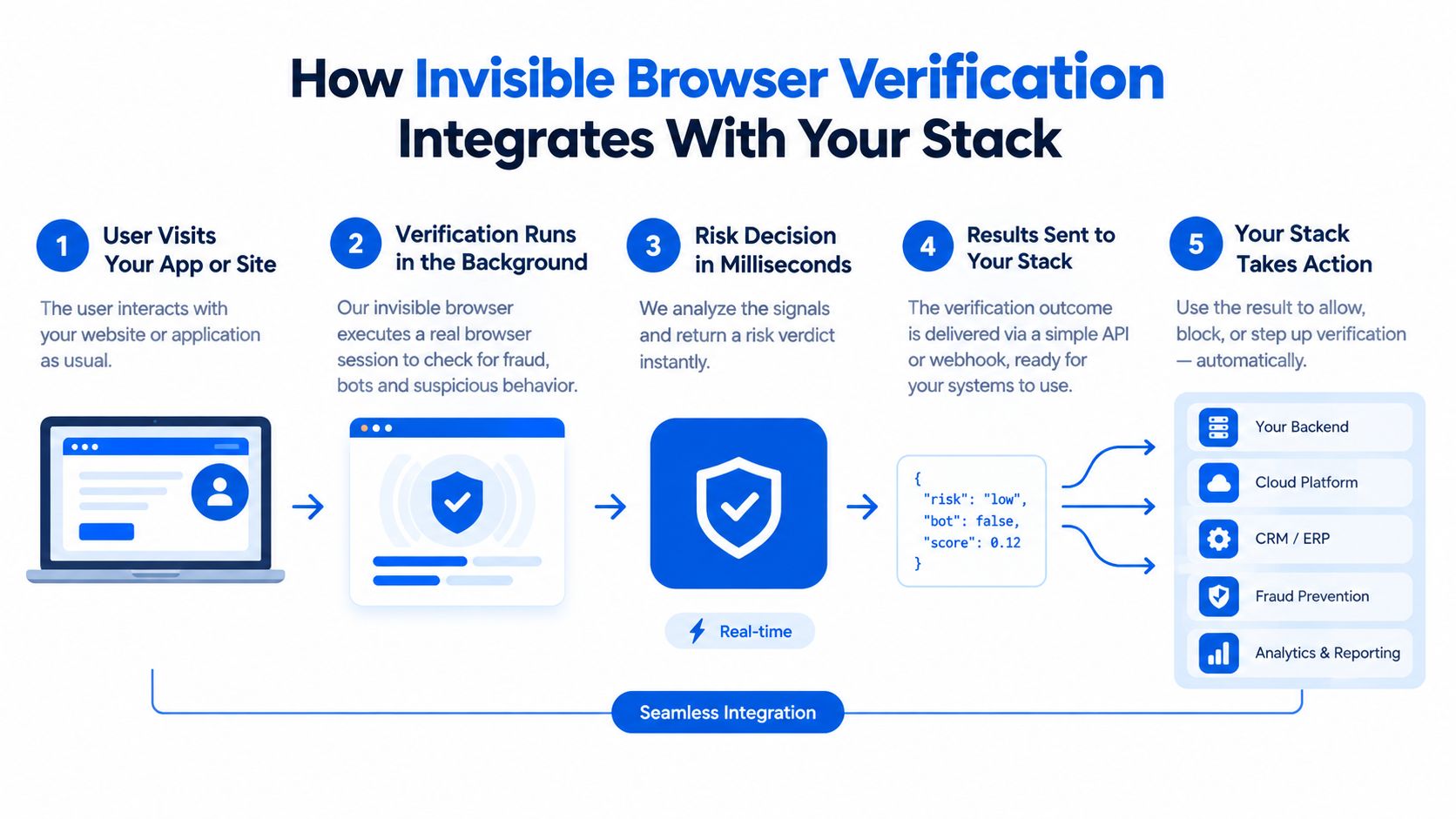
The cleanest integration separates proof collection from authorization. The browser collects evidence that a legitimate browser environment made the request. The server decides whether that evidence is fresh, valid, and appropriate for the action.
A typical MANDATE-shaped flow looks like this:
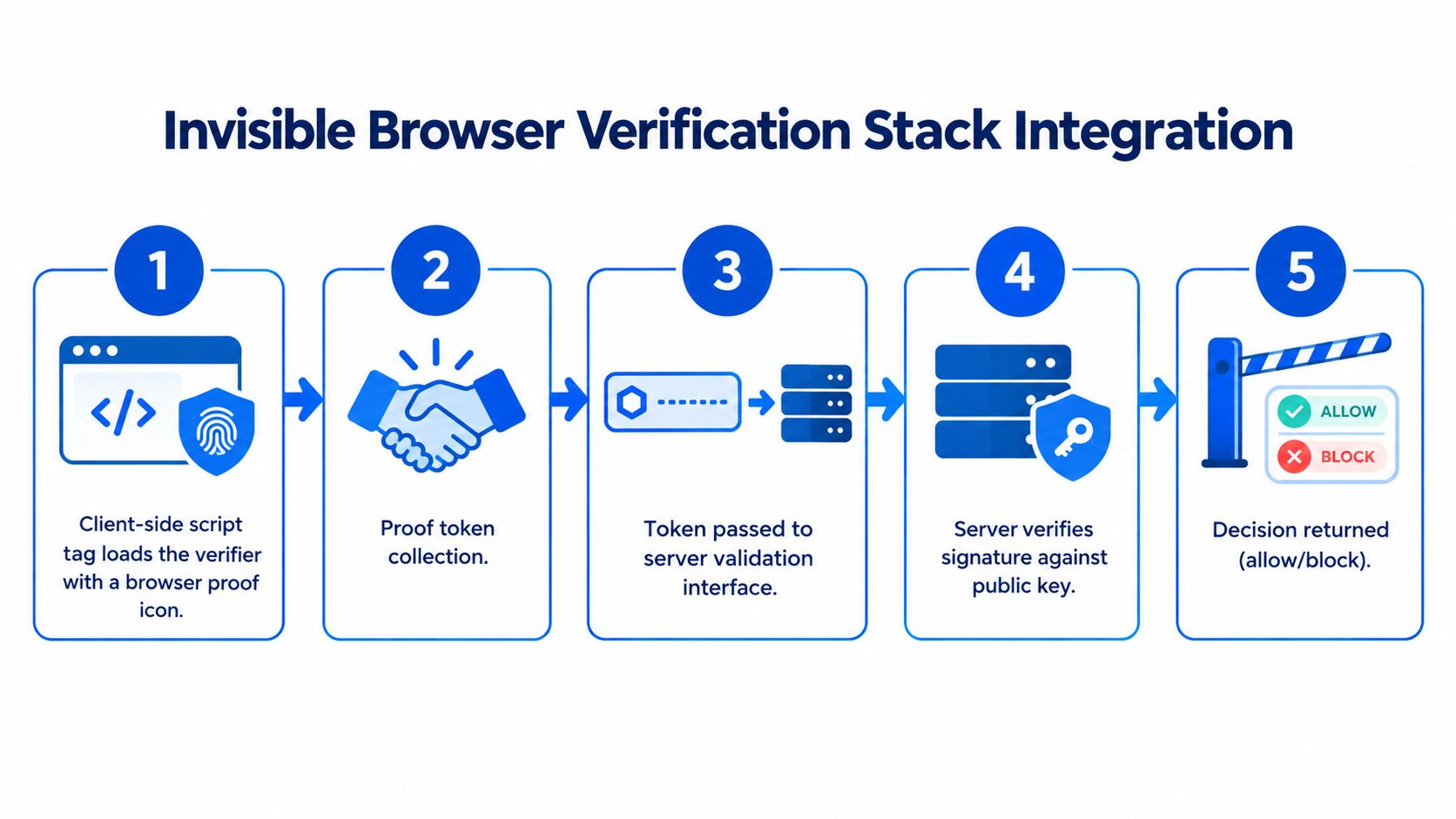
- The page loads a client-side verifier through a script tag.
- The verifier collects browser proof invisibly when the user reaches a protected form.
- The client attaches the resulting signed token to the signup, login, checkout, or other request.
- Application middleware sends the token to the server-side validation interface.
- The server checks the proof and returns an allow, flag, or block outcome before the action is processed.
The exact code depends on the framework, but the security sequence should remain recognizable. The signup handler should receive a request containing both business data and browser proof. Before creating the user record, the handler should validate the token, check that it is fresh, confirm the expected origin, associate it with the intended session or action, and reject a stale or mismatched result.
The checks engineers should make explicit
Origin allow-listing prevents proof issued for an unexpected site context from being accepted. Token TTL, or time to live, limits the useful lifetime of captured proof. Replay protection makes the same evidence unsuitable for a later request, while session binding reduces the chance that proof is detached from the browser context that generated it.
The fallback path matters too. Some browsers may fail to execute the verifier because of script restrictions, privacy settings, network errors, or unusual embedded contexts. A fallback shouldn't trust the request without verification. It can route the user to a controlled review path, request a stronger application-level check, or flag the action for later handling.
The browser can present proof, but only the server should decide whether the proof is acceptable.
This differs from treating reCAPTCHA as a front-end widget with a siteverify round trip. Both approaches can include server verification, but teams often implement score-based systems as a client callback followed by a threshold decision. A server-authoritative browser-proof design makes freshness, origin, session association, and action policy explicit in the application boundary. The client-or-server integration discussion is useful when deciding which logic belongs in browser code and which must remain on the server.
Don't describe browser proof as a replacement for authentication. Credential stuffing, for example, uses username and password pairs stolen from another breach and tests them automatically against a target application. OWASP distinguishes this from credential cracking, where the attacker guesses passwords in its credential-stuffing definition. Browser verification can identify automated login traffic, but login protection still needs MFA, passkeys or other authentication controls, breached-password detection, rate limits, and account policies.
Matching the Alternative to Your High-Value Actions
A public comment can follow a lighter verification path than checkout. Checkout automation may test payment details, reserve scarce inventory, or place unauthorized orders, so the policy must reflect the action and its consequences. OWASP's bot-management taxonomy separates fake-account creation from checkout abuse, supporting workflow-specific controls rather than one rule for the whole domain in its anti-automation guidance.
| Use case | Friction tolerance | Primary threat | Recommended approach |
|---|---|---|---|
| Signup | Low to moderate | Bulk account creation and scripted registrations | Invisible, server-validated browser proof, with flagging before hard blocks |
| Login | Low for returning customers | Credential stuffing and automated session abuse | Browser verification before processing, combined with MFA, breached-password checks, and rate limits |
| Password reset | Moderate for suspicious requests | Account takeover and reset abuse | Fresh proof plus strong identity and session controls |
| Checkout | Low for legitimate buyers, higher for anomalies | Payment testing, inventory hoarding, and unauthorized purchasing | Server-side validation, transaction-risk checks, limits, and payment-provider controls |
| Ticket purchase | Low during normal access, higher during surges | Scalping, scripted purchasing, and inventory consumption | Invisible verification with staged escalation and action-specific enforcement |
| Comment posting | Higher tolerance | Spam and automated content submission | Turnstile, hCaptcha, honeypots, or server-side filtering, depending on abuse volume |
Account creation and login
Signup creates lasting application state. It can trigger email delivery, provisioning, trials, invitations, and other downstream work. Verify fresh browser proof before committing those resources, then begin with observation or flagging. Compare the results with disposable-email signals, request velocity, and confirmed abuse before introducing hard blocks.
Login requires a narrower tolerance for false positives because a mistaken decision interrupts an existing customer. Browser verification can slow automated credential testing before password processing, but it cannot establish that the person presenting valid credentials owns the account. OWASP's credential-stuffing prevention guidance identifies MFA as the strongest defense against most password-related attacks and cites a Microsoft estimate that MFA would have stopped 99.9% of account compromises in the guidance and its cited analysis. That estimate applies to MFA, not browser bot detection.
Transactions and inventory
Checkout and ticketing need server-authoritative decisions because each request can move money or consume limited inventory. Validate fresh browser proof before creating an order, attempting payment, or confirming a reservation. Keep transaction limits, payment-provider controls, authorization checks, and fraud screening active. Browser verification adds evidence about the request, not permission to complete the transaction.
Password changes and account recovery require the same request-specific handling. Per NIST session and replay guidance, reject any request that reuses a previous payload, even if correctly formatted, and require fresh proof tied to the current session in its session and replay guidance. Bind the proof to the intended action and verify it on the server before changing credentials or completing recovery.
The practical rule is simple: if an action creates state, moves money, or consumes inventory, prefer fresh server-side token validation over behavioral scoring alone. Comments and lead forms may justify a visible challenge or lighter filtering when interruption costs more than the likely abuse. The right reCAPTCHA alternative is therefore an architecture choice, defined by the proof the server can validate and the risk attached to each workflow.
Rolling Out a reCAPTCHA Alternative Without Blocking Real Users
A hard cutover can turn a small verification defect into a conversion incident. If completion rates fall after launch, the team may not know whether token validation, browser coverage, origin settings, latency, or policy thresholds caused the change. Run the alternative beside the existing control first. Collect decisions without gating traffic, then compare the result with business outcomes.
Start with Observe mode
In shadow mode, the alternative evaluates the same protected requests as reCAPTCHA while leaving the user flow unchanged. Log the request context, server-side validation result, browser family, action, latency, and eventual business outcome. Limit collection to data the team needs for diagnosis, and define retention before enabling detailed logging.
Compare the systems across real cohorts rather than relying on one overall score. Track:
- Legitimate-user pass-through: How many confirmed genuine users would have continued?
- Suspicious-traffic intervention: How often did the alternative flag or block traffic later associated with abuse?
- Challenge completion: When a stronger step appears, how often do suspicious and legitimate users complete it?
- Submission latency: How much time does verification add to form submission?
- Validation failures: Which browser families produce expired, malformed, missing, or mismatched tokens?
- Business impact: Do signup, login, purchase, and recovery flows continue normally?
As noted earlier, the benchmark methodology supports segmenting results by automation class and workflow. Apply that testing discipline to your own application: run replayed requests, scripted browsers, and higher-fidelity agents separately against signup, login, and checkout. Record pass-through, intervention, validation failure, and latency for each cohort. This reveals whether a server-verified browser proof works consistently where the risk is highest.
Enforce gradually and keep a kill switch
Use feature flags to enable enforcement for one action, cohort, or traffic segment at a time. Begin with observation or flagging where a mistaken block would be costly. Add blocking only after the team understands false positives and has confirmed that the server rejects stale, missing, or mismatched proof. Keep rollback controls outside the verifier, so an integration failure cannot prevent the team from disabling enforcement.
Set rollback criteria before launch. Examples include a sudden increase in validation failures for one browser family, a material change in successful checkout completion, or more support contacts from legitimate users. Product teams can fix UX issues with Otter A/B while security teams determine whether the problem comes from verification or the surrounding form.
The Observe-before-enforce rollout model provides a practical operating pattern. Rollout is a measurement problem before it is a configuration problem. Define what each decision means, how it affects users, and how to reverse it before turning browser evidence into a production block.
Choosing the Right reCAPTCHA Alternative for Your Team
Team size changes the right answer because it changes who will operate the control after launch. A solo developer may need a practical invisible layer that protects signup or checkout without building an abuse platform. A larger security organization may prefer several signals, custom policy logic, and independent telemetry around server-side validation.
| Team Profile | Primary Use Case | Recommended Approach | Key Trade-off |
|---|---|---|---|
| Solo developer | Signup or public forms | Lightweight invisible browser verification with server validation and Observe mode | Less front-end friction, but the developer must still monitor failures and tune policy |
| Growth-stage product team | Signup, login, and checkout | Action-specific browser proof, staged enforcement, and application risk controls | More implementation work, but better control over high-value decisions |
| Regulated enterprise | Identity, recovery, and transactions | Layered server-side validation with MFA, authorization, fraud controls, and detailed audit telemetry | Stronger governance and evidence, with greater integration and operating cost |
For small teams, a service such as MANDATE can reduce the need to build browser-proof collection and decision plumbing from scratch while keeping routine verification invisible. The team still needs a server validation path, clear fallback behavior, and monitoring. No vendor removes the need to understand the application's abuse patterns.
Growth-stage teams should protect actions separately. The same threshold or response shouldn't apply to a comment and a payment attempt. Use Observe mode, compare decisions with confirmed outcomes, and let the application choose whether to allow, flag, or block.
Regulated enterprises should treat any reCAPTCHA alternative as one layer in access control. MFA or passkeys establish stronger user authentication. Secure sessions, CSRF defenses, authorization checks, payment controls, and transaction freshness protect the action itself. Browser verification helps identify automated traffic before expensive or sensitive processing, but it isn't an authentication protocol and doesn't guarantee protection from account takeover.
The operational standard is consistent across all three profiles. Choose a system with understandable token security, useful rollout telemetry, and policies the team can tune. A frictionless interface isn't enough if the server can't explain why a request passed, reject stale proof, or recover safely from a bad rule.
MANDATE offers invisible browser verification, client-side browser-proof collection, server-side validation, and allow, flag, or block enforcement for important website actions without CAPTCHA puzzles. Review how it can fit your signup, login, checkout, or transaction workflow by visiting MANDATE.