
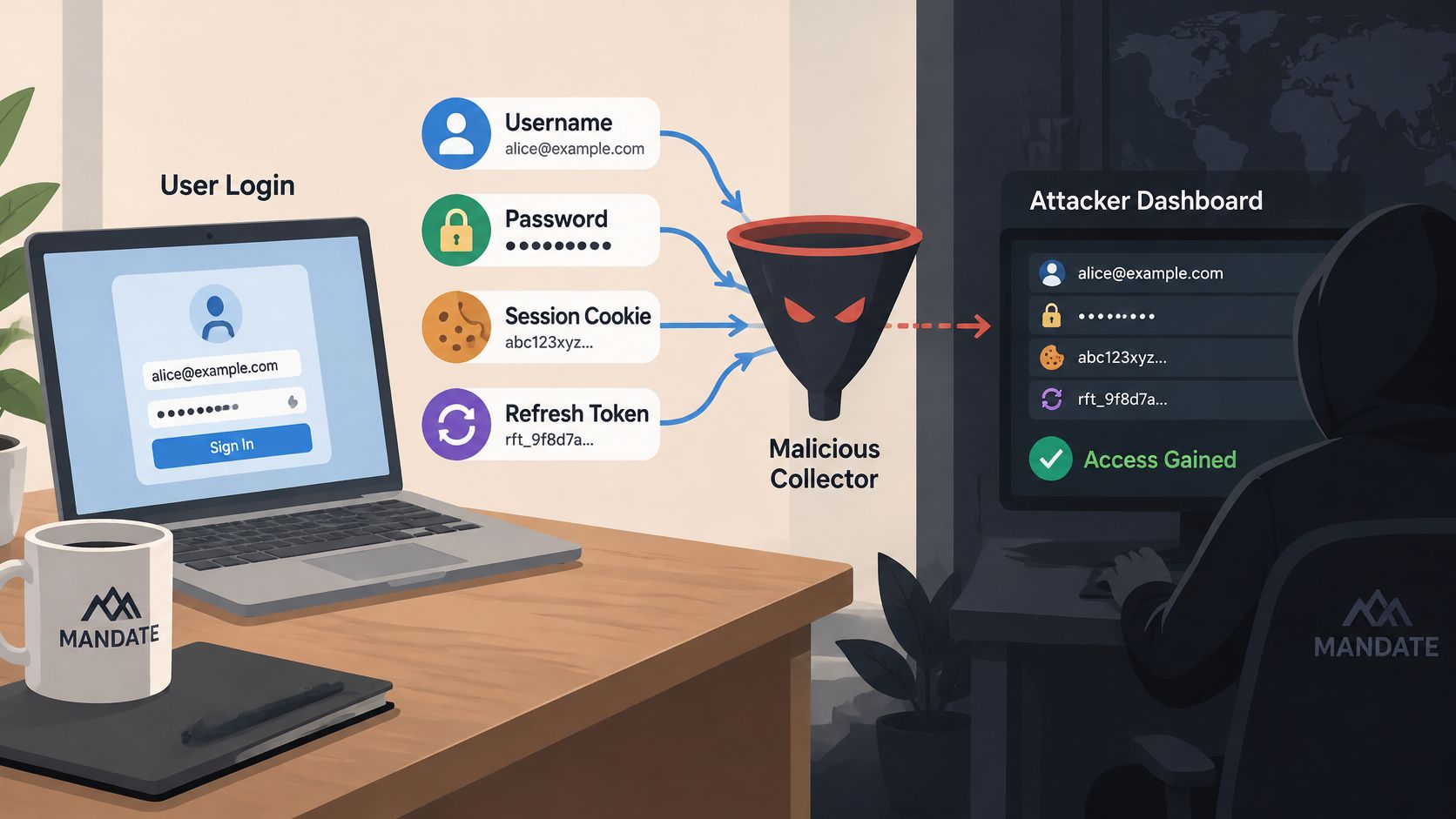
Credential harvesting is the deliberate collection of usernames, passwords, session cookies, and tokens so an attacker can later reuse them against a real service. Common collection paths include fake sign-in pages, adversary-in-the-middle phishing relays, browser-stealing malware, and scripts that capture form inputs.
A team may already require multi-factor authentication and still investigate suspicious checkouts or recovery requests. The missing distinction is often credential theft versus session theft: protecting the front door doesn't necessarily invalidate an access pass issued earlier.
What Credential Harvesting Means in Practice
The practical answer to “what is credential harvesting?” is stealing usable authentication material rather than guessing it. Password guessing tries possible secrets until something works. Harvesting obtains secrets from a person or browser, then uses them against the genuine service.
A copied house key offers a useful analogy. The person holding it doesn't need to pick the lock because the lock recognizes the key, not the person who originally received it. Similarly, an application can accept a valid stolen credential unless another control identifies or constrains its use.
Passwords and Browser Access Passes
A session cookie is a browser-held value that lets a website associate subsequent requests with an established session. A bearer token is an access credential whose possession can be enough to exercise its permissions. A refresh token can obtain replacement access tokens, subject to the identity provider's rules.
These artifacts serve different purposes:
Usernames and passwords support authentication, the process of establishing an account's identity.
Session cookies carry continuity after authentication, so the browser doesn't repeat the entire login for every request.
Access and refresh tokens support access to services and continuation of authenticated access.
The distinction matters after multi-factor authentication, or MFA, which requires additional evidence beyond a password. A stolen authenticated session may let an attacker act after the legitimate user has completed MFA. Constraints such as device binding, which ties token use to a particular device, can reduce that opportunity.
Microsoft's guidance on identity tokens recommends phishing-resistant credentials, device- and risk-based access controls, and device-bound tokens where possible to reduce theft and replay risk.
For teams deciding how to protect accounts after credential theft, Digital Footprint Check provides a related credential-compromise resource. The useful starting question is which artifact was exposed, because a password, an active session, and a refresh token require different containment decisions.
How Attackers Collect Logins and Session Tokens
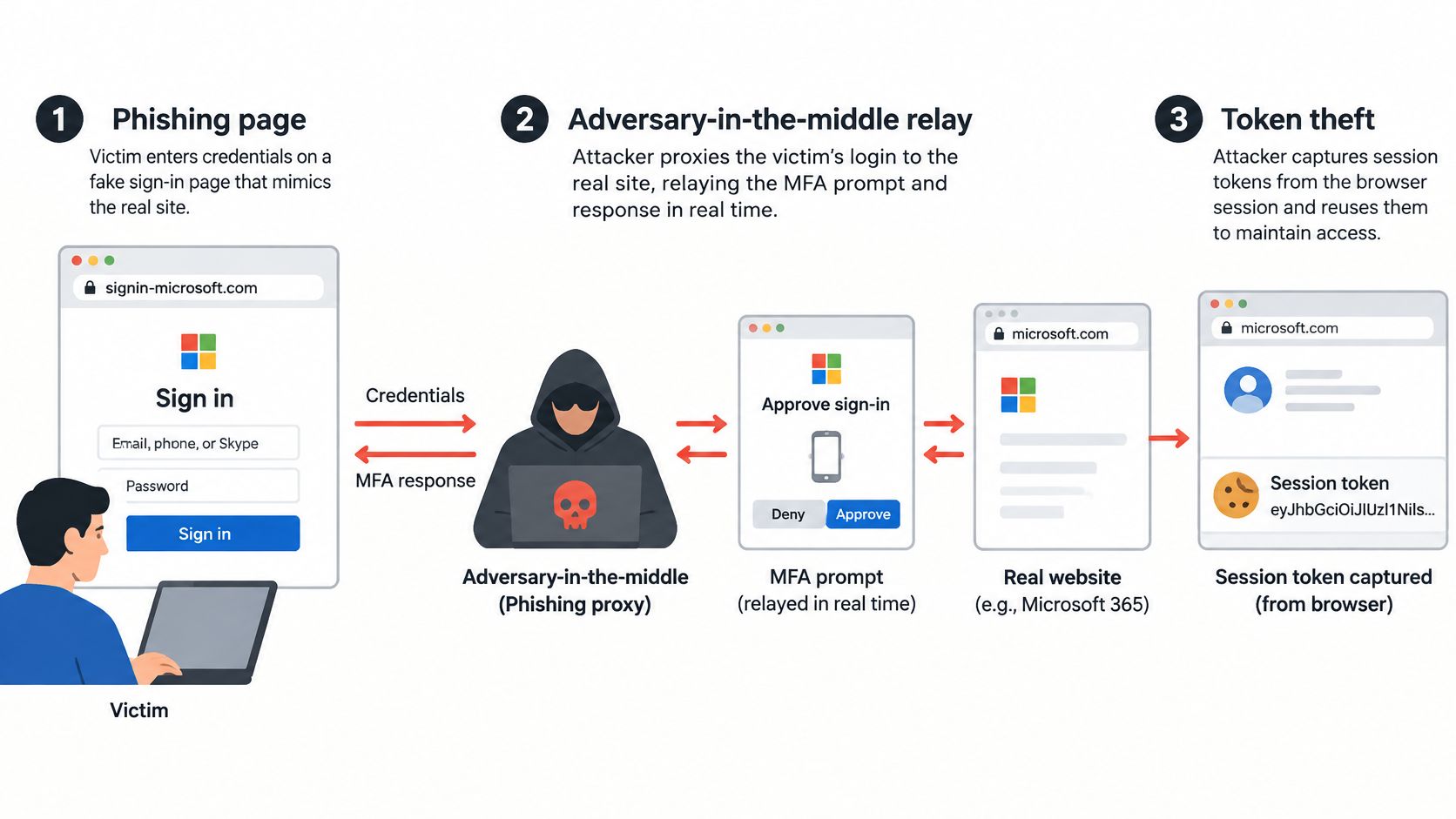
Synthetic scenario: A fictional customer receives a delivery-exception email and follows a lookalike link. The page resembles the delivery service's sign-in screen, and the customer enters a username and password.
A basic phishing page captures those entries. An adversary-in-the-middle relay goes further: the attacker passes the login interaction to the genuine service, including an MFA interaction, while remaining between the customer and that service. The attacker may then capture the resulting session artifact.
Different Collection Paths, Different Stolen Material
The fictional delivery scenario illustrates the distinction between collecting a password and collecting an authenticated session. Other collection paths don't require the same email or relay:
Imitation sign-in pages collect information entered into an attacker-controlled form.
Infostealer malware collects saved credentials and browser cookies from an affected device.
Form-grabbing scripts read input fields before submission. The collection happens while the person types or submits, rather than through later password guessing.
These aren't interchangeable descriptions of a single technique. A fake form may capture only what the customer enters. A relay can capture authenticated state, while malware can collect artifacts already stored in the browser.
Why Session Theft Changes Containment
Recorded Future reported that 276 million malware-sourced credentials indexed in 2025 included active session cookies, representing 31% of the total, and that this figure increased 30% between the first and second halves of the year, within that indexed dataset (Recorded Future's identity trend report). Those figures describe malware-sourced material, not all phishing incidents or every organization's exposure.
A password reset alone may not terminate sessions already issued. Investigators therefore need to establish whether session revocation and refresh-token invalidation are also necessary.
Changing the lock doesn't retrieve an access pass that another system still accepts.
Finchum Fixes IT's resource on phishing protection for small businesses offers related business-oriented context. For engineers, the operational boundary is equally important: harvesting collects the material; credential stuffing tests previously obtained username-and-password pairs against authentication systems.
Why Harvested Credentials Lead to Account Takeover
MFA doesn't make harvesting irrelevant. It can reduce password-only compromise, but an attacker holding authenticated state may avoid repeating the password-and-MFA interaction. The engineering question becomes whether the application should accept the current session and requested action.
Verizon's 2025 Data Breach Investigations Report analyzed more than 22,000 security incidents, including 12,195 confirmed breaches, and found credential abuse in 22% of breaches, the leading initial attack vector, while phishing accounted for 16% (Verizon's report announcement). These are breach findings, not estimates of the percentage of website visitors who are attackers.
From Collection to a Business Action
The usual progression separates acquisition from subsequent abuse:
Collection: The attacker obtains a password, cookie, or token.
Validation: Automated requests test whether the material still works.
Account access: The attacker examines available permissions and account functions.
Reuse: The attacker attempts fraud, data theft, further collection, or access to connected resources.
Synthetic scenario: A retailer has strong MFA on its main sign-in page, but a separate recovery path accepts a reused password without equivalent checks. An attacker validates that harvested password through the weaker path and establishes access that reaches checkout or promotion redemption.
The weakness isn't that the main MFA control failed cryptographically. The application offered another route to consequential actions. In a session-theft variant, the attacker could instead arrive with already-authenticated state.
Identity Isn't Transaction Permission
The practical consequences can include disputed orders, customer-support investigations, account restoration, and loss of customer confidence. Teams should distinguish confirmed unauthorized actions from suspicious requests before estimating impact.
Vigil Security's resource on responding to account hijacking provides related incident-response context. Engineering teams can also use this explanation of account takeover fraud when mapping compromised access to affected application functions.
Authentication establishes identity. Authorization determines permitted actions, while transaction validation checks whether a particular operation satisfies business rules. Password rotation and MFA help with the first problem, but they don't independently establish that a current recovery, checkout, or redemption request is authorized.
Detection Signals That Point to Credential Abuse
Detection should connect sign-in activity with what happens afterward. A dashboard limited to failed passwords won't explain suspicious actions performed through a valid session.
In SSO-provider logs examined in Verizon's credential-stuffing research, credential stuffing represented a median 19% of daily authentication attempts across a two-year period, reaching 25% at enterprise-sized organizations, 12% at small businesses, and 44% on the highest observed day (Verizon's credential-stuffing analysis). These figures describe the observed provider logs, not a universal baseline for every application.
Signals Worth Investigating
A useful monitoring plan groups evidence by account, session, protected action, and suspected attack pattern.
| Signal | Question for investigation |
|---|---|
| Failed sign-ins spread across many accounts | Are requests coordinated even though each account sees little traffic? |
| A session artifact appears in an unexpected context | Does the change fit legitimate behavior or possible replay? |
| A protected action lacks the expected browser flow | Is this a supported caller, an integration issue, or automation? |
| The same sensitive request arrives repeatedly | Is this a normal retry or attempted duplicate execution? |
| Recovery requests follow increased login activity | Are the events connected to the same accounts or sessions? |
No individual row proves malicious intent. A customer may change networks, retry a slow checkout, or use an accessibility tool that behaves differently from a typical browser journey.
Why an IP Threshold Isn't Enough
An attacker can distribute low-volume traffic across many addresses. A per-address counter may remain below its threshold while an account or application receives coordinated abuse. Conversely, strict address-based blocking can affect legitimate customers sharing a network.
Investigation rule: Record the evidence behind a decision, not just the decision itself.
Decision records should identify the protected action, the signals evaluated, and the result. Teams can then compare suspicious activity with legitimate completion events and support reports, rather than assuming every blocked request represents prevented fraud.
Raw credentials and bearer artifacts shouldn't become routine diagnostic fields. The monitoring design should preserve enough correlation to investigate behavior without creating another collection of reusable secrets.
Comparing Prevention Controls and Their Limits
No single control covers collection, authentication, session use, and business transactions. A useful comparison starts with the attack stage each control addresses, then states what remains outside its scope.
For replay protection, freshness matters: a previously valid message shouldn't remain sufficient indefinitely. NIST's authentication guidance describes replay resistance and identifies nonces or challenges, values intended for a particular transaction, as mechanisms for establishing freshness.
Prevention Controls by Stage and Limitation
| Control | What It Addresses | Main Limitation |
|---|---|---|
| Phishing-resistant MFA using FIDO- or PKI-based authenticators | Credential phishing during authentication | Doesn't independently validate every later transaction |
| Short-lived, scoped credentials | Duration and reach of stolen access | Misuse can still occur within the permitted lifetime and scope |
| Device-bound tokens | Token use outside the intended device | Depends on platform support and correct enforcement |
| Server-side checks of current token state | Expired, revoked, or otherwise unacceptable credentials | Requires an authoritative check at acceptance time |
| Replay detection and transaction-bound proof | Reuse of previously accepted authentication or action evidence | Doesn't establish the business legitimacy of an otherwise fresh request |
| Account-, session-, and IP-based rate limits | Excessive or coordinated request volume | Low-volume abuse may still fit permitted limits |
| Idempotency | Duplicate effects from repeated state-changing requests | Doesn't determine whether the original action was authorized |
| Browser verification | Evidence that a request followed an expected browser flow | Isn't proof of human identity or a complete defense against every real-browser agent |
FIDO refers to public-key authentication standards; PKI, or public key infrastructure, uses certificates and cryptographic keys. The value of phishing-resistant authentication is reducing the opportunity to reuse secrets collected through an imitation sign-in interaction.
Browser Verification as an Additional Layer
MANDATE is an option for protecting browser-originated sign-in, account creation, recovery, checkout, reservation, and promotion-redemption actions from automated abuse without CAPTCHAs. A browser script collects proof, and hosted server-side verification checks current server state before the application accepts the protected action.
The experience uses no checkboxes, puzzles, or user-facing challenges. That removes those challenge interactions, but it doesn't remove the need to evaluate legitimate-user impact or verify current product availability before integration.
Browser verification is not proof of human identity. Authentication, authorization, transaction validation, idempotency, and payment-provider fraud controls remain necessary. The integration should add evidence to an acceptance decision, not turn browser proof into unrestricted permission.
Rolling Out Browser Verification Without Blocking Customers
A controlled rollout begins with an application action, not a site-wide blocking switch. Checkout may be a suitable candidate when its callers, completion event, and retry behavior are well understood.
A Narrow Observe-to-Enforce Sequence
Select the protected action and inventory callers. Identify browser traffic, mobile clients, server integrations, and operational tooling that can reach the route. Supported non-browser callers need an explicit policy rather than accidental rejection.
Define legitimate completion. For checkout, the meaningful event might be an authorized order accepted under the application's business rules. A successful verification response alone isn't a completed purchase.
Run in Observe mode. Record evidence and proposed decisions without enforcing them. Compare grouped patterns with completion events, errors, retries, and customer-support reports.
Review impact before enforcement. Investigate clusters that would be denied, including supported clients with unusual behavior. Document why a proposed policy is appropriate for the selected action.
Enforce narrowly with rollback ready. Apply the policy to that action while keeping unrelated routes unchanged. Establish who can disable enforcement and which application outcomes trigger that decision.
Synthetic example: A fictional ticketing platform first observes its reservation route. Engineers compare suspected automation with valid reservation completions and identify supported callers that need separate handling.
The platform then enforces a selected policy on reservations alone. Account creation and checkout retain their existing behavior while the team evaluates reservation outcomes.
Preserve the Controls Around Verification
OWASP's anti-automation guidance recommends rate limiting across multiple keys, including accounts, sessions, devices or cookies, and application-specific identifiers rather than IP addresses alone. It recommends token-bucket or sliding-window algorithms and warns that fixed-window counters allow bursts at window boundaries.
A token bucket replenishes a request allowance over time. A sliding window evaluates activity over a moving interval. Either approach still needs limits appropriate to the action and its legitimate callers.
Idempotency gives retries the same intended effect as the original operation rather than creating duplicate effects. For checkout, the application should associate an idempotency key with the operation and handle reuse consistently, so a network retry doesn't create another order.
The distinction between client-side collection and server-side verification matters here. Browser evidence must inform a server-side acceptance decision; a client-only check isn't an authoritative enforcement boundary.
Implementation Checklist and Next Steps
A useful pilot has a clear acceptance boundary, an observable outcome, and a reversible policy. Starting with a well-understood action makes it easier to distinguish attack evidence from integration mistakes.
The implementation plan should also separate incident containment from ongoing prevention. Revoking compromised access addresses an existing exposure; protecting a browser action addresses what the application will accept next.
Readiness Checklist
Inventory protected actions. Include sign-in, signup, recovery, checkout, reservations, and redemption where applicable. Identify the business consequence of unauthorized use.
Map callers and completion events. Document supported browsers, applications, integrations, and the server event that represents legitimate completion.
Confirm server-side authority. Keep authentication, authorization, and transaction validation on the acceptance path.
Review session containment. Establish how the application expires and revokes affected sessions and token grants.
Set account and session limits. Evaluate coordinated activity as well as traffic from individual addresses.
Add idempotency handling. Specify how the application recognizes retries and rejects conflicting reuse.
Prioritize phishing-resistant MFA. Choose the accounts and workflows where deployment should begin, including recovery implications.
Define Observe-mode review criteria. Record acceptable behavior, suspicious patterns, legitimate-user impact, and the evidence needed to enforce.
Write rollback steps. Assign an owner and document how enforcement can be withdrawn without disabling unrelated security controls.
Choose the Integration Before the Pilot
Hosted verification is the normal integration path. Local cryptographic verification is limited to an offline emergency tier and legacy compatibility; it shouldn't be treated as an interchangeable default.
Before implementation, the team should read the official quickstart documentation and the research note on observing before enforcing. Current availability, supported integration details, and any preview limitations need confirmation in official documentation rather than assumptions based on a general product description.
The concrete next step is a pilot plan for a selected action, with an owner, a completion event, review criteria, and rollback conditions.
MANDATE protects important website actions from automated abuse without CAPTCHAs, adding browser verification alongside existing identity and transaction controls. Engineering and security teams can visit MANDATE to review current documentation and plan an Observe-mode pilot for a selected sign-in, recovery, or checkout action.